

Picture a holiday sale on your online store. Traffic climbs, orders roll in, and revenue should follow. Then pages start to load slowly, the checkout stalls, servers give out, and the site goes down at the worst possible moment. Scalability is what stands between that scenario and a record sales day, and it is far cheaper to plan for early than to fix under fire.
This guide walks through the practices and e‑commerce development services that keep a platform fast under pressure, whether the pressure comes from Black Friday, a marketing push, or a sudden jump in your brand's popularity. It also shares the load-testing playbook and the real marketplace projects we use to get platforms ready for peak traffic.
What is e‑commerce scalability, and why does it matter?
E‑commerce scalability is a platform's ability to serve more shoppers, products, and orders without slowing down or crashing. A scalable store keeps fast page loads during a large traffic spike, adds computing resources on demand, and grows its catalog without a rebuild. It spans four layers: application code, the database, cloud infrastructure, and third-party integrations.
The stakes keep rising. Shopify's summary of an EMARKETER forecast estimates that global retail e-commerce sales will reach $6.88 trillion in 2026, 7.2% above its 2025 estimate. As more demand moves online, the platforms behind stores have to absorb traffic peaks without letting search, inventory, or checkout become a bottleneck.
When a store cannot keep up, the cost is immediate. A 2022 survey of 200 UK e-commerce decision-makers at companies with more than £10 million in revenue found that respondents had lost an average of 10% of revenue to downtime and performance issues over the previous two years. That result is specific to the survey, but it shows why performance planning matters. As visitor numbers grow, a platform can hit one of these technical limits:
- Performance issues: high traffic causes slow page loads or crashes when the platform was not designed to handle increased load efficiently.
- Database constraints: as transactions grow, an unoptimized database becomes overwhelmed, leading to slow queries and poor performance.
- Server capacity: without room to scale, servers run out of resources and cause downtime during sudden traffic spikes.
- Security vulnerabilities: more transactions mean more exposure to data breaches and fraud, which can expose customer data and erode trust.
- Integration challenges: connecting new payment gateways, inventory systems, and other services gets harder as the platform grows.
A platform built to handle growth shows a few clear traits:
- It handles traffic surges. The platform absorbs sudden spikes such as a Black Friday rush without degrading.
- It supports a growing catalog. Adding products and categories does not slow the site down.
- It integrates cleanly. New tools and features plug in without a rebuild.
- It keeps performance steady. Load times stay fast and the shopping experience stays smooth under high load.
- It scales infrastructure both ways. The platform supports vertical scaling (more power per server) and horizontal scaling (more servers or services).
The payoff is concrete: a better customer experience that builds loyalty, higher cost efficiency because you avoid emergency overhauls, and more revenue from handling transactions smoothly. That is why scalability belongs in the plan from day one, or in a roadmap to migrate toward it before growth forces your hand.
Ready-made platforms vs custom e‑commerce development
There are two main ways to build an online store. The first is a ready-made platform like Shopify, WooCommerce, or Wix. The second is a custom platform built from scratch. Both fit different situations, so it helps to weigh them against your business model before you commit.
Ready-made e‑commerce platforms
Platforms like Shopify, WooCommerce, and Wix provide a commerce foundation instead of making you build every store function from scratch. Hosted products such as Shopify and Wix operate the underlying infrastructure, while WooCommerce runs on hosting that you choose and manage. All three offer extensions for functions such as reviews, payments, inventory, and shipping, but they differ in how much control and operational responsibility they give your team.

Hosted platforms operate capacity behind the scenes, which removes much of the infrastructure work from the merchant. A self-hosted WooCommerce store scales only as well as its hosting, caching, database, and extensions are configured. Either route can suit a business with standard workflows and shorten the path to launch, though advanced customization still needs development work.
Plenty of large brands run their stores on platforms like Shopify Plus, and many companies migrate off custom legacy systems that became a burden to maintain, moving to a hosted platform so they can focus on the business rather than the plumbing.
The limits appear when you need deep customization or complex logic. A marketplace, for example, usually needs custom design and backend development to work well. Large businesses with unique requirements or proprietary components often prefer a custom solution so they keep full control over their infrastructure and can match the platform to their model.
Here is how the popular platforms compare on scalability, along with the trade-offs that come with them:
| Platform | Pricing model | Scalability strengths | Scalability limits |
|---|---|---|---|
| Shopify | Monthly subscription plus transaction fees | Automatic server scaling, optimized themes, and tools for high-volume orders | Costs rise with subscription and transaction fees; limited deep customization |
| BigCommerce | Monthly subscription with tiered plans | Adjusts resources for fluctuating traffic to hold performance during peaks | Higher cost for advanced features; harder for beginners; limited customization |
| Magento (Adobe Commerce) | Open-source core, paid enterprise license | Configurable auto-scaling in the cloud; adds instances when a spike is detected | Needs significant time and expertise for development and maintenance |
| Wix eCommerce | Monthly subscription | Sites scale automatically to handle more traffic and transactions during peak hours | Can hit limits as you grow; constraints around SEO and speed on media-heavy sites |
| WooCommerce | Free plugin; cost depends on hosting and extensions | Lets the team choose hosting, caching, and database capacity for the expected workload | Needs technical expertise; performance and security depend on your hosting choices |
The broader pros and cons, beyond scalability alone:
Pros:
- Quick setup: you can launch a store in hours when it needs no custom design or logic, which is a fast way into the market.
- Ongoing support: the provider maintains the backend as part of your subscription.
- Predictable pricing: most plans are subscription-based, so you know the recurring cost.
Cons:
- Provider lock-in: you depend on the provider's infrastructure and roadmap, and moving to another platform later is hard.
- Transaction fees: some platforms charge per-transaction fees unless you use their payment gateway, which cuts into margins.
A path we often recommend sits between the two: a headless setup that keeps Shopify's reliable backend and pairs it with a custom Next.js storefront. We start with a design that matches your brand and build the storefront on top of the platform. The trade-off is that a decoupled storefront adds API round-trips between the front end and the backend, so we lean on edge caching and a CDN to keep pages fast. On our pricing page, a headless store starts from $15,000 and 6 weeks, which gives you a unique front end without maintaining the whole backend yourself.



Custom e‑commerce development
The other path is to build a custom platform: a custom design and a frontend and backend built from scratch on technologies you choose. This is the right call when you need features and logic that standard platforms cannot offer.
With custom e‑commerce development, you can build far more than a storefront: marketplaces, stores for digital products, auction sites, rental services, ticketing systems, and other products with complex business logic.

Custom development comes with its own trade-offs:
Pros:
- Versatile functionality: the product follows your exact workflow and can implement any business model, not just a standard store.
- Unique design: a custom storefront reflects your brand identity, which is memorable and helps engagement.
- Control over data and security: you own the software and the customer data, and you choose the hosting and security setup without depending on a vendor's platform.
Cons:
- Higher upfront cost: building from scratch needs a larger initial investment than a ready-made plan.
- Longer timeline: design, development, and QA take time, so launch is slower than with a turnkey platform.
- Need for a tech partner: you need an experienced team to build and maintain the platform, so choosing the right partner matters.
A custom platform gives you control over how the system scales. The team can design elastic application capacity, isolate expensive workloads, and support international requirements such as multiple languages and currencies. None of that happens automatically; the architecture and operating setup have to be built and tested for the expected load. The next section covers how we approach it in practice.
How to build a scalable e‑commerce platform: eight practices
You make a custom platform scalable by choosing the right technologies and development approaches. Here are the eight practices we rely on.
1. Choose a suitable technology stack
The stack shapes performance, resource allocation, integrations, and security. A safe rule is to favor technologies backed by large companies or big open-source communities: they are well maintained, documented, and supported, which speeds up development and extends the platform's lifespan. These are the technologies we reach for most:
Frontend technologies:
- React
- Angular
- Vue.js
- Next.js
Backend technologies:
- Laravel
- Node.js
- Ruby on Rails
- Django
Cloud and hosting services:
- AWS (Amazon Web Services)
- Google Cloud Platform (GCP)
- Microsoft Azure
Databases:
- PostgreSQL
- MongoDB
- MySQL
Content delivery networks:
- Cloudflare
- Akamai
For backend development we often recommend Laravel, because it keeps the codebase organized and its queue and task-scheduling features handle asynchronous work that helps a platform scale. On the frontend we usually pair it with React and store data in PostgreSQL. Over the years our team has built up a GitHub library of Laravel packages that speed up building scalable architectures across sectors, not only e‑commerce. If you are weighing a mobile-first store, our article on React Native e‑commerce app development covers the stack choice in depth.
2. Pick the right architecture pattern
The architecture pattern affects development speed, deployment, and long-term scalability. As of 2026, two patterns dominate custom e‑commerce: monolithic and microservices.
A monolithic architecture keeps all components in one interconnected application. It is simpler to build and deploy at first, but it gets unwieldy as the app grows, because scaling one part often means scaling the whole thing.
A microservices architecture splits the app into small, independent services that talk over APIs. Each service handles one function and can be built, deployed, and scaled on its own. That modularity makes it a strong fit for high-load stores and large catalogs.
A 2023 Gartner Peer Community survey of 300 engineering and IT leaders found that, among 145 microservices adopters who could identify improvements, 63% selected deployment speed, 56% agility, and 51% application scalability. The same report also records the operational trade-offs. Our usual starting point is a modular monolith, with services split out when measured load, release independence, or team ownership justifies the extra complexity.
3. Use cloud infrastructure
Cloud infrastructure means running on internet-hosted servers instead of local machines. It gives a platform access to flexible resource management. With autoscaling configured around meaningful metrics, the application tier can add or remove capacity as demand changes. Its other benefits include:
- Usage-based and provisioned pricing models let teams adjust capacity as needs change.
- Failover mechanisms reduce downtime and keep the store running through technical issues.
- Providers offer encryption, identity controls, and audit tooling, while the product team remains responsible for configuring them and meeting its compliance obligations.
4. Apply load balancing and caching
Load balancing spreads incoming traffic across several servers so no single one is overwhelmed, which is essential during high-traffic periods. It also makes it easy to add or remove servers, so you can scale horizontally as load grows. Common tools are Nginx, HAProxy, and AWS Elastic Load Balancing.
Caching stores copies of frequently accessed data in fast temporary storage, so the server and database do not have to recompute it every time. That cuts response times and lightens the load on the backend. Redis, Memcached, and Varnish are the usual choices. Together, load balancing and caching let a store handle high traffic and heavy data requests smoothly.
5. Optimize the database
A database can become a bottleneck under load, so its behavior needs to be measured rather than assumed. In practice, that means inspecting query plans, adding the right indexes, managing connection pools, caching hot reads, and using replicas or partitioning only when the workload calls for them.
Managed services like Amazon RDS, Google Cloud SQL, and Azure SQL Database automate maintenance tasks such as backups and expose monitoring, availability, storage, and replica options. They do not make every database workload scale automatically: compute size, query performance, connection limits, and replica topology still need deliberate capacity planning.
6. Use modular and API-first development
API-first and modular development let you add features and integrations without reworking the rest of the platform. API-first means designing well-documented, standardized APIs before the core app, so the platform connects cleanly to third-party services and adapts as needs change. Modular development splits the app into self-contained modules, each owning one function, which isolates changes and makes upgrades and scaling far easier.
7. Build in SEO performance
SEO performance keeps a scalable store discoverable as its catalog grows. The core practices: a clean URL structure that is easy for crawlers to read, fast loading times with browser caching, and a mobile-friendly design, since a large share of shopping traffic is now mobile. Fast, well-structured pages earn both better rankings and more user trust.
8. Automate wherever you can
Automation cuts manual work and lets a platform handle more volume without adding headcount. Here is what is worth automating:
- Order processing, inventory, and customer relationship management, through platform plugins or custom integrations.
- Personalized product recommendations, targeted campaigns, and customer segmentation, using AI to tailor the shopping experience.
- Payments, invoices, and refunds, through gateways like Stripe and PayPal with minimal manual steps.
- Customer support, using chatbots to answer common questions and provide instant help.
- Data collection and reporting, with tools like Google Analytics that surface real-time performance metrics.
Together, these steps let operational processes grow in volume and complexity without turning into a bottleneck.
Our e‑commerce load-testing playbook
E‑commerce load testing means simulating peak shopper traffic against your platform before a real sale, so you find where it slows or breaks while there is still time to fix it. We treat it as its own milestone before a big event, because good architecture stays a hypothesis until you push the platform to its limit on purpose. Here is the playbook we follow.
Test the full journey, not the homepage. The most common load-testing mistake is hammering the landing page while the real pressure sits in search, add-to-cart, checkout, and payment. We script the whole shopper journey so the test reflects what actually happens on sale day.
Measure what users feel. We watch a small set of signals: the 95th-percentile response time (the experience of the slowest 1 in 20 requests), the error rate, and throughput in requests per second. For front-end responsiveness we track Interaction to Next Paint against Google's Core Web Vitals target of 200 milliseconds or less at the 75th percentile. Averages hide problems; percentiles expose them.
Size the test against real peaks. We set a baseline from your normal peak traffic, then combine it with campaign forecasts, expected concurrency, and the shape of the shopper journey. We also account for traffic that is not human: bots, scrapers, and the AI shopping agents that now hit storefront APIs at machine speed. The target may be several times the baseline for a major event, but there is no useful default multiplier. We also check whether configured autoscaling reacts quickly enough, because adding capacity after requests have already timed out does not protect the checkout; for a known event we pre-scale ahead of time rather than trust autoscaling alone, and a front-end queue can smooth the first wave while the backend catches up.
Run the right test types. Load tests confirm behavior at expected peaks, stress tests push past documented limits to find the breaking point, spike tests simulate a sudden flash-sale rush, and soak tests hold sustained load long enough to expose memory leaks, queue buildup, and slow database contention. The duration and schedule should cover the product's traffic cycles and background jobs, with enough time left for another test after fixes. Tools like k6, JMeter, Locust, and Gatling drive the traffic.
Design for graceful failure. Passing a load test is about more than adding servers; it is about how the platform behaves when a part of it gives out. We use circuit breakers so one slow service does not drag down the rest, graceful degradation so secondary features like recommendations and reviews fail before checkout does, and safeguards against retry storms, where a wave of automatic retries turns a small hiccup into a self-inflicted outage. Concurrent writes to inventory and payment during a flash sale are a common source of database deadlocks, so we test that path directly.
“Teams often treat load testing as a box to tick the week before a sale, which is exactly when it is too late to act on what you find. We run it as a milestone with room to respond: push the checkout and payment paths above the expected peak, see where the system bends, fix it, and run it again. Finding a limit in a test is the good outcome; the bad one is finding it live, with customers in the funnel.”
Evgeny Leonov, CTO at Ronas IT
How we build scalable marketplaces and high-load platforms
The practices above come from real projects. Marketplaces are a demanding case, because they carry heavy business logic and unpredictable traffic across buyers, sellers, and admins. Our marketplace development services and e‑commerce development teams have delivered products with different scaling requirements. Here are three examples.
An eco cosmetics marketplace for the Australian market
We designed and built a mobile marketplace for eco cosmetics that connects local Australian brands with conscious shoppers. We started with an MVP to enter the market quickly, building the mobile apps in React Native from a single codebase and the backend in Laravel, with Laravel Nova powering an admin panel that manages buyers, sellers, catalogs, and discounts, so the client can add sellers, products, and categories without shipping a new app release. Stripe Connect handles payments and the KYB checks used during seller onboarding.
A peer-to-peer rental marketplace
Lainappi is a peer-to-peer rental marketplace we built for the Finnish market on React Native, with Stripe Connect handling payments between item owners and renters. Internal product analytics recorded 5,685 app launches and 2,397 registered accounts, providing a real production example of the catalog, booking, and payment flow.
A high-load community platform
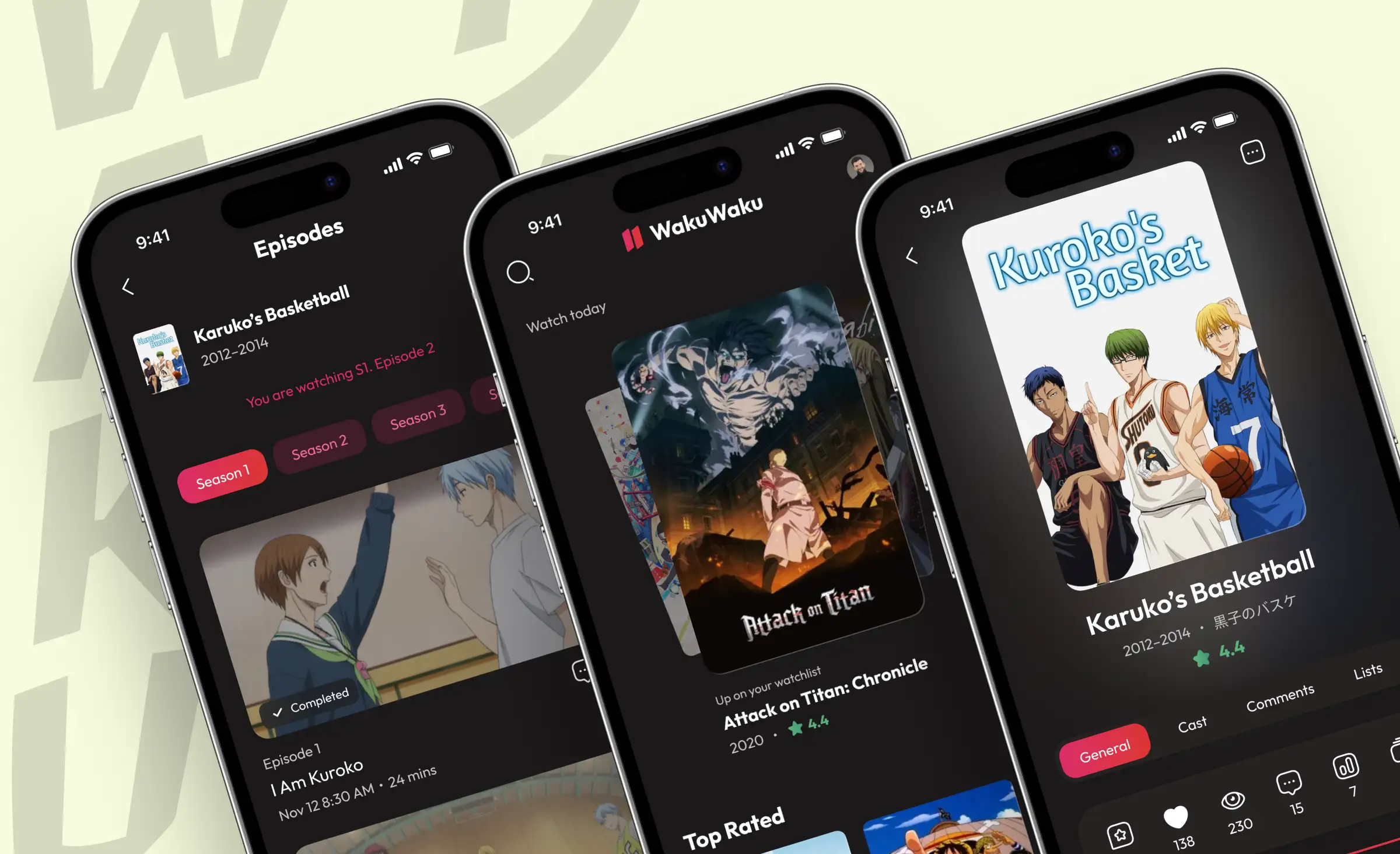
A community app for anime enthusiasts shows the infrastructure side of scaling. Platforms like this see large waves of users, so for this community platform we chose Next.js and Laravel and deployed the infrastructure on AWS. Kubernetes manages the application services and provides the mechanism for configured workload scaling. Depending on the deployment, the project uses Cloud SQL or Amazon RDS as a managed database option. This architecture prepares the product for changing demand, but the actual capacity still depends on configuration and load testing.
Wrapping up
Scalability is cheapest when you plan for it in the first version. If you are starting fresh, pick proven technologies, choose an architecture that matches your load, run on the cloud, and load-test the full checkout before your first big sale. If you already have a platform straining under growth, get a specialist to map a roadmap toward more headroom before the next peak exposes the gaps.
And do not overlook ready-made tools. A headless Shopify setup or the right plugins can carry a large part of the load, which frees your team to focus on the parts of the product that make you different.
Whether you want to layer e‑commerce features onto your business or build a custom platform from scratch, our team is set up to support both paths, from the first design to the load test before launch.
Frequently Asked Questions (FAQs)
What is e-commerce scalability?
How do you load test an e-commerce platform before a sale?
Should I use Shopify or build a custom e-commerce platform?
What tech stack is best for a scalable e-commerce platform?
Microservices or a monolith for e-commerce?
How do you scale the database for high traffic?
How much does it cost to build a scalable e-commerce platform?
How long does it take to launch a scalable online store?
Related posts







Related Services
React Native App Development Services
Save time and costs with Ronas IT's React Native app development, allowing cross-platform capabilities for iOS and Android. Our team has built 20+ React Native apps since 2020, ensuring rapid development, flexible maintenance, and cost-effective solutions.
DevOps Services
Accelerate your software delivery with Ronas IT's DevOps services. We streamline development and deployment through CI/CD automation, proactive monitoring, and secure cloud infrastructure. Enjoy faster releases, minimal downtime, and scalable solutions — letting you focus on growth while we handle seamless operations.
Custom Web App Development Services
Build secure, scalable web applications with Ronas IT’s custom web app development services. Our team covers the full cycle — from concept and UI/UX design to development, testing, and ongoing support — using leading tech like React and Laravel. With 200+ custom apps delivered across various industries, we ensure intuitive interfaces, smooth integration, and solutions tailored to your business goals.