Designing for web accessibility: WCAG compliance and inclusive UX best practices

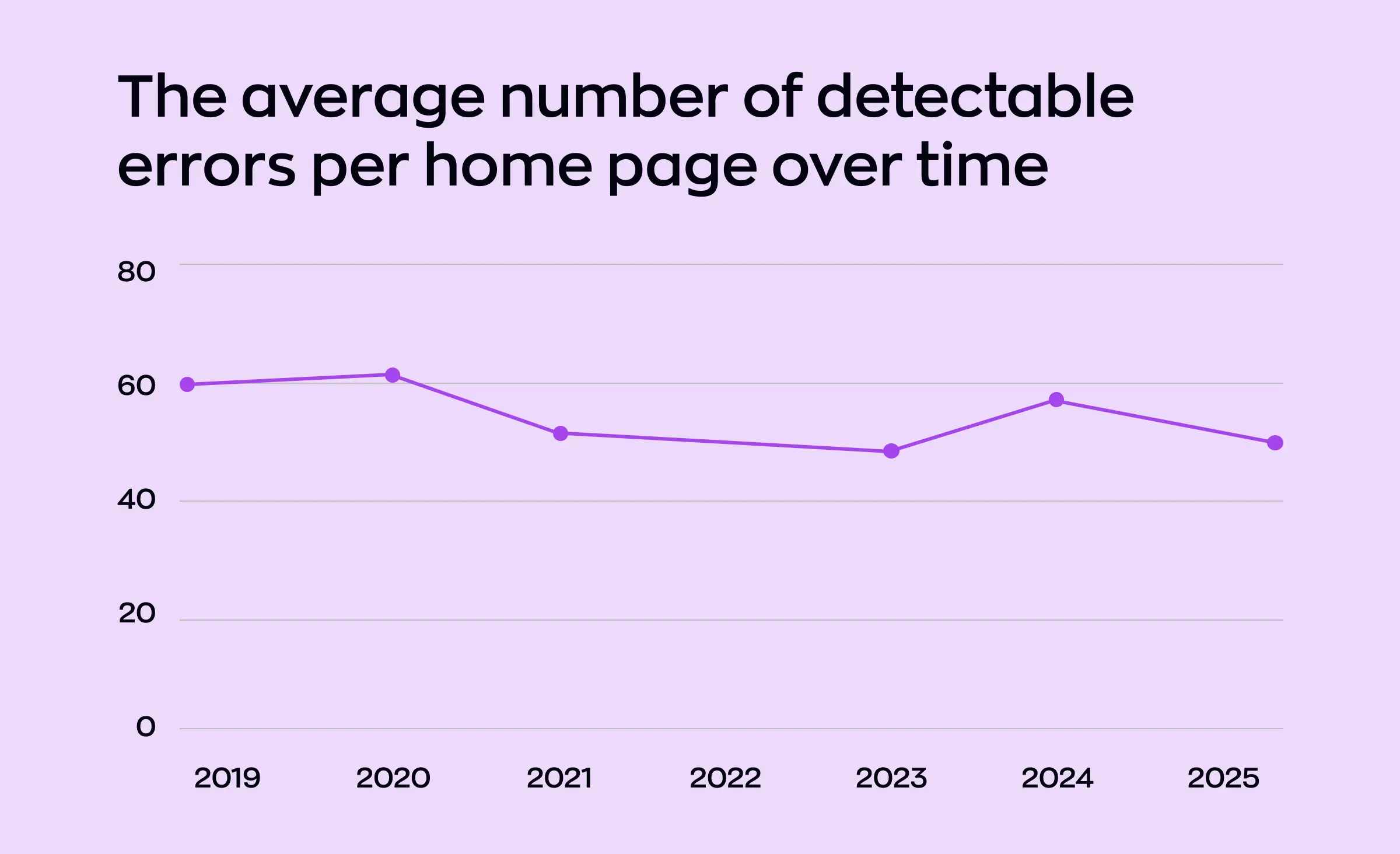
Millions of people rely on the web every day, yet the majority of websites remain difficult or even impossible for everyone to use. According to the latest WebAIM Million study, more than 94% of leading homepages fail to meet essential accessibility standards, averaging over 50 accessibility errors per page. These staggering numbers highlight just how urgent designing for web accessibility WCAG compliance has become — for organizations of every size and industry.
Web accessibility guidelines, such as the Web Content Accessibility Guidelines (WCAG), set a clear standard for making digital product design usable for all. Following these guidelines is not just the right thing to do — it's also tied to important legal requirements accessibility in many regions. Whether you're a UI/UX designer, web developer, or product manager, prioritizing accessible web design is now a key part of your role.
By embedding inclusive UX best practices into every stage of the UI/UX design and frontend development process, you can improve the user experience for people of all abilities. Adopting inclusive design principles not only helps reach a wider audience, but also demonstrates commitment to ethical digital product design practices at the heart of today's digital transformation.
Accessible web design also tends to be better optimized for search engines — giving you a valuable edge in SEO optimization and business performance. As you'll discover in this article, designing for web accessibility WCAG compliance is not just a technical checklist, but an opportunity to build a stronger, more inclusive online world for everyone.
The fundamentals of web accessibility
What is UI/UX accessibility?
Accessible web design means building sites and products that everyone can use — no matter their ability, technology, or situation. By focusing on usability for all users, you help remove barriers and give equal access to information, services, and opportunities. This foundation is essential for any modern approach to web design and digital product design.
Why accessible web design matters
When teams prioritize UI/UX accessibility and follow strong design principles, they not only meet ethical and legal standards, but also create better experiences for everyone. Websites that include inclusive design principles — like clear navigation, readable text, and well-labeled forms — are easier to use and understand. This results in smoother website usability and better overall user experience.
Key roles and responsibilities in accessible web design
UI/UX design and frontend development are central to achieving accessibility goals. Designers and developers work together throughout the product design process, making sure accessibility is built in from the start. Whether you're designing layouts or coding features, web accessibility guidelines should be remembered in decision-making. Teams who practice accessible web design and UI/UX design consistently create more inclusive products that work for everyone.
The business case for UI/UX accessibility
The need to design for everyone is more than just a trend — it's a smart move for business. Sites built with inclusive design principles and proven design principles naturally reach a larger audience, reduce support needs, and avoid costly fixes down the road. User-centered design accessibility is not just about compliance; it creates opportunities for growth and lasting impact.



By making web design, frontend development, and product design accessible for all, you are laying the groundwork for a better, more open web — one user at a time.
Understanding WCAG and digital accessibility standards
Every successful digital project design starts with a clear understanding of accessibility standards. These official rules make sure all users can experience the web without barriers, and they provide a roadmap for teams aiming to build truly inclusive digital products.
What are web accessibility guidelines and digital accessibility standards?
WCAG compliance web accessibility guidelines lay out what it means for a website or product to be accessible. These digital accessibility standards are internationally recognized, helping developers, designers, and businesses create web experiences that people with diverse abilities can navigate, understand, and use.
WCAG compliance web: Principles and levels
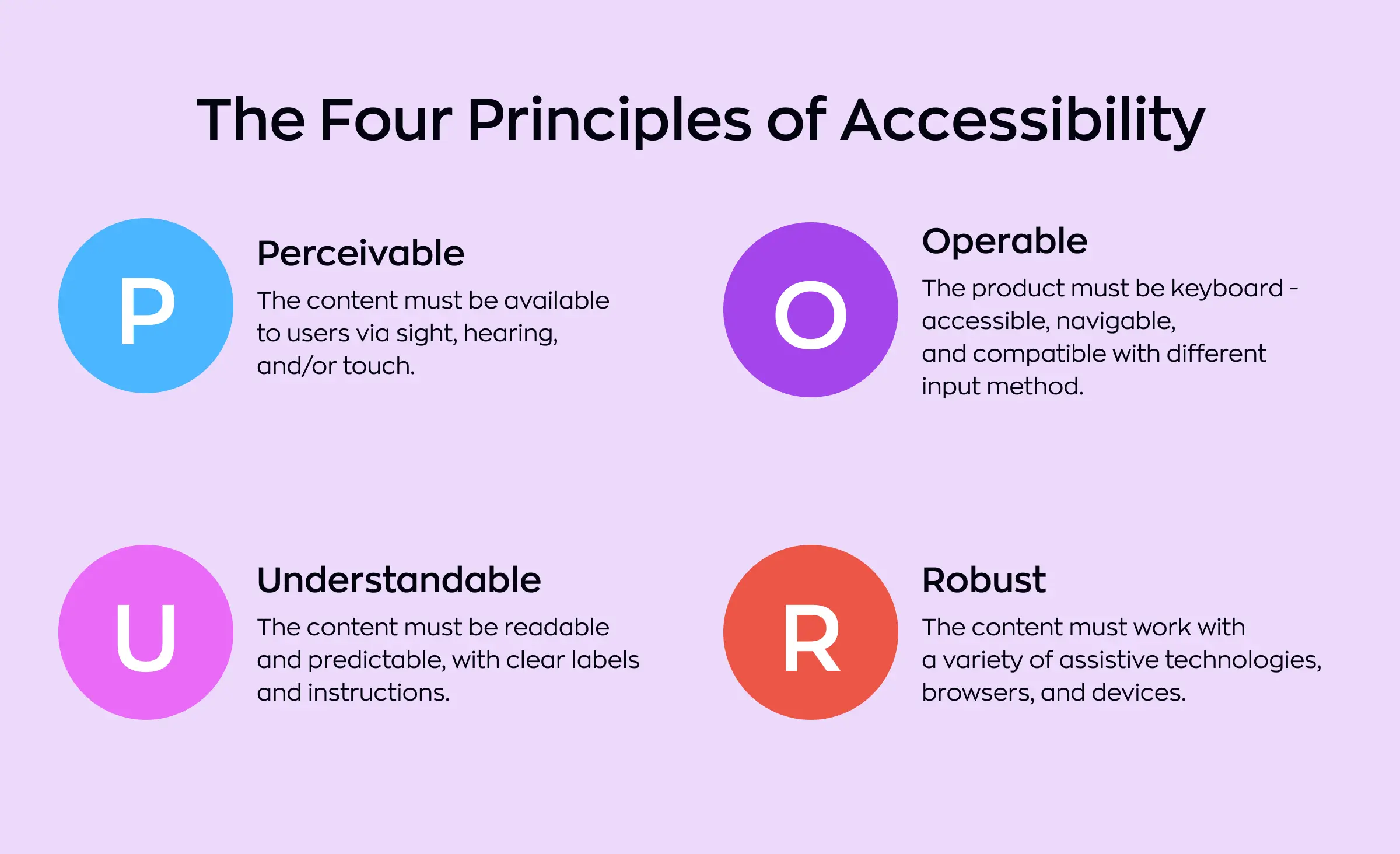
At the core of WCAG compliance web are four key principles:
- Perceivable: All information and user interface elements must be presented in ways every user can perceive, whether through sight, hearing, or touch, following the “design for everyone” approach. For example, providing text alternatives for images, captions for videos, and providing readable color contrast helps users with vision or hearing impairments access your content.
- Operable: Your website's functionality must be available to all and design with UI components accessibility in mind. This means every interactive element — like links, forms, or buttons — works for people using keyboards, screen readers, or alternative input methods. Designing keyboard-accessible menus, providing visible focus indicators, and allowing enough time to interact with content are fundamental for operability.
- Understandable: Content and interfaces should be clear and predictable. Accessible user experience includes straightforward instructions, error messages that explain what went wrong, and layouts that remain consistent across pages. Using plain language and building logical navigation help users not to get lost or confused.
- Robust: When a site is robust, it works reliably across browsers, devices, and assistive technologies. Following proper coding practices and using valid HTML allows your digital content to adapt as technologies change, supporting not just today's web development tools but those coming in the future.
To recap:
WCAG compliance web is measured at three levels of conformance:
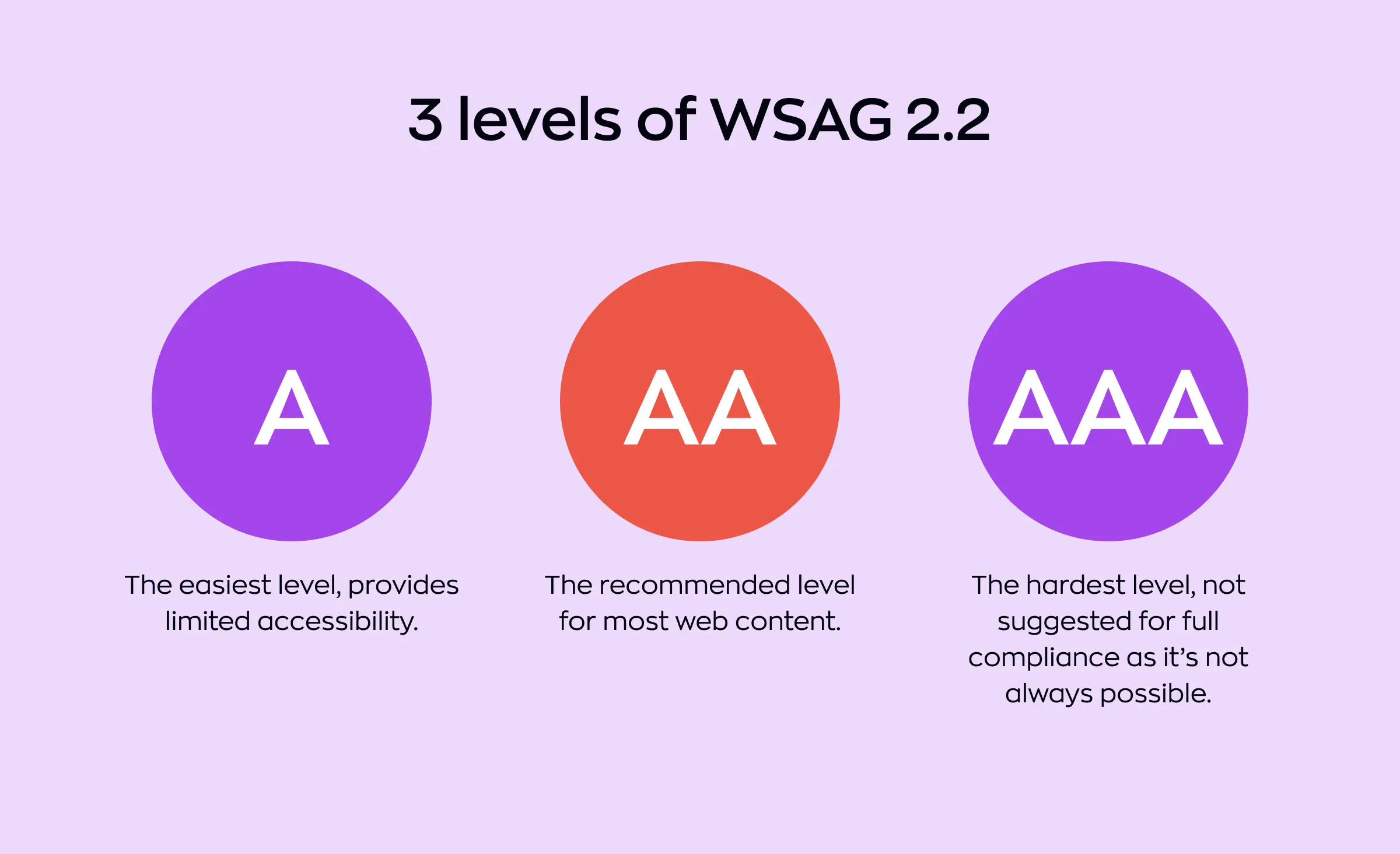
- Level A: This is the entry point for WCAG compliance web accessibility — the most basic requirements. Meeting Level A helps remove the most fundamental barriers but does not guarantee broad usability.
- Level AA: Considered the standard for most public and commercial websites, Level AA addresses the biggest and most common obstacles for a wide variety of users, including color contrast, text resizing, and navigation aids.
- Level AAA: This is the most rigorous level, offering the highest degree of UI/UX accessibility. Few websites achieve Level AAA for all content, but aiming for it in critical areas — like customer service or important public information — can make a real difference for users with more complex needs.
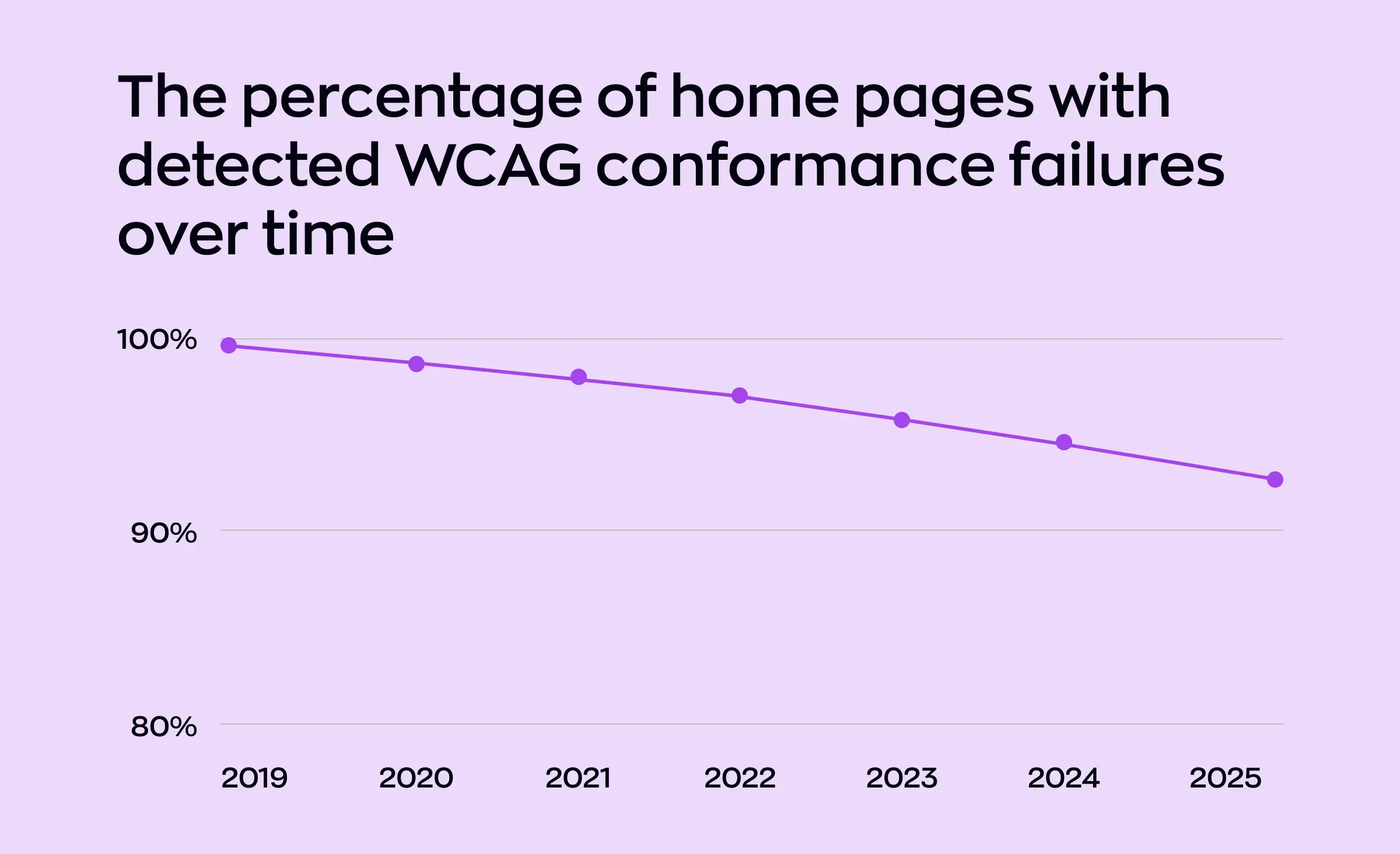
Following inclusive UX best practices and aiming for at least Level AA in your digital transformation will help to make sure your site is not only legally compliant in many regions but is also far more usable and welcoming to everyone. Making accessibility a priority at the UI/UX design, frontend development, and web development stages means you're building digital products that serve every visitor, regardless of ability or device.
Legal and business importance of UI/UX accessibility
Many regions now set legal requirements accessibility based on WCAG compliance web or similar rules. Following inclusive design principles isn't just about avoiding lawsuits — it can also protect your brand's reputation and build trust with a wider audience. Digital product design noncompliance may result in legal and financial risks, but the benefits of building access in from the start are much greater.
The broader view: Digital transformation and SEO optimization
Adopting digital accessibility standards supports modern digital transformation and future-proofs your products. Accessible websites tend to be better for everyone, from users to search engines — boosting your rankings through SEO optimization and extending your reach. Teams involved in UI/UX design, frontend development, and web development see measurable gains when accessibility is a routine part of their workflow.
Adopting digital accessibility standards supports digital transformation and strengthens SEO optimization in several measurable ways:
- Improves user experience: Accessible digital product design helps to make sure that all users — including those with disabilities — can navigate, understand, and interact with content easily. This leads to longer session times, higher engagement, and lower bounce rates, which search engines reward with better rankings.
- Improves technical SEO: Clean, semantic code and proper use of alt text, labels, and structured data not only make content screen-reader friendly but also help search engines crawl and index pages more effectively.
- Boosts brand reputation and trust: Organizations that integrate user experience accessibility demonstrate social responsibility and inclusivity — key factors that improve brand perception and customer loyalty across digital channels.
- Future-proofs digital assets: Accessible digital product design aligns with evolving global regulations (like WCAG, ADA, and EN 301 549), providing compliance and reducing the cost of retroactive fixes as digital transformation progresses.
- Drives innovation and team efficiency: Incorporating accessibility early in the design and web development workflow promotes better collaboration among UI/UX, frontend development, and content teams, fueling innovation and agile transformation practices.
- Expands reach and market potential: By creating inclusive user experiences, businesses unlock access to a wider audience, including the estimated 1.3 billion people worldwide with disabilities — a major growth lever for digital transformation initiatives.
- Strengthens content performance: Accessible content (clear headings, transcripts, captions) improves readability, content structure, and keyword visibility, directly boosting SEO optimization outcomes.
By making accessibility guidelines and WCAG compliance the foundation of your web development, you don't just meet minimum standards — you raise the quality and usability of everything you build. Centering these inclusive design principles helps you create online experiences that welcome all users, today and in the future.
Inclusive UX best practices for accessible web design
Crafting a truly accessible website starts with applying inclusive UX best practices throughout your design process. These practices ensure your products work for the widest possible audience and improve overall user experience for everyone.
Focus on inclusive design principles
Start by following inclusive design principles and proven design principles in every project. Good UI/UX design takes into account the varied ways people interact with websites — whether by using a mouse, keyboard, or assistive technology. By leading with user-centered design accessibility, your team can address diverse needs from the very beginning.
Build accessibility into every UI component
Every interface element matters in accessible web design. Use UI components accessibility by making buttons, links, and menus clear and easy to reach. Leveraging UI/UX accessibility and semantic HTML for accessibility helps give structure to your content, making it easier for devices like screen readers to interpret the information correctly.
Adding ARIA attributes (Accessible Rich Internet Applications) to your code further enhances support for users with disabilities, enabling them to understand the purpose and state of interactive elements on the page.
Make navigation simple for all
Navigation is a cornerstone of both website usability and inclusive UX best practices. Make sure keyboard navigation web is always possible — meaning users can move through the site without a mouse. Testing for screen reader compatibility also guarantees that your menus, forms, and buttons are usable by those relying on assistive software.
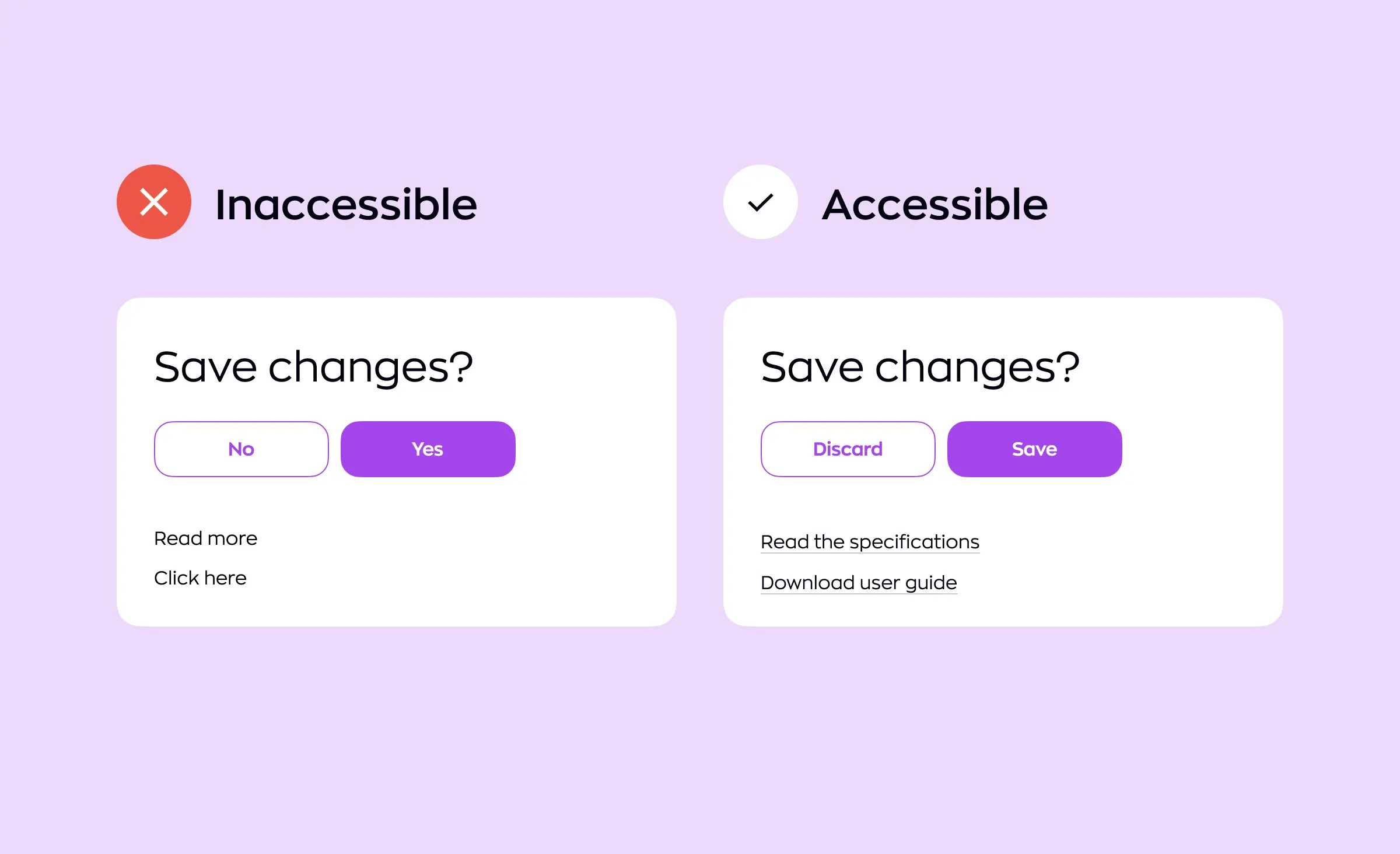
Prioritize contrast and readability
According to leading web accessibility guidelines, strong contrast ratio accessibility and readable typography help users with low vision or color blindness access your content comfortably. Avoid small, faint text and always check contrast between foreground and background colors.
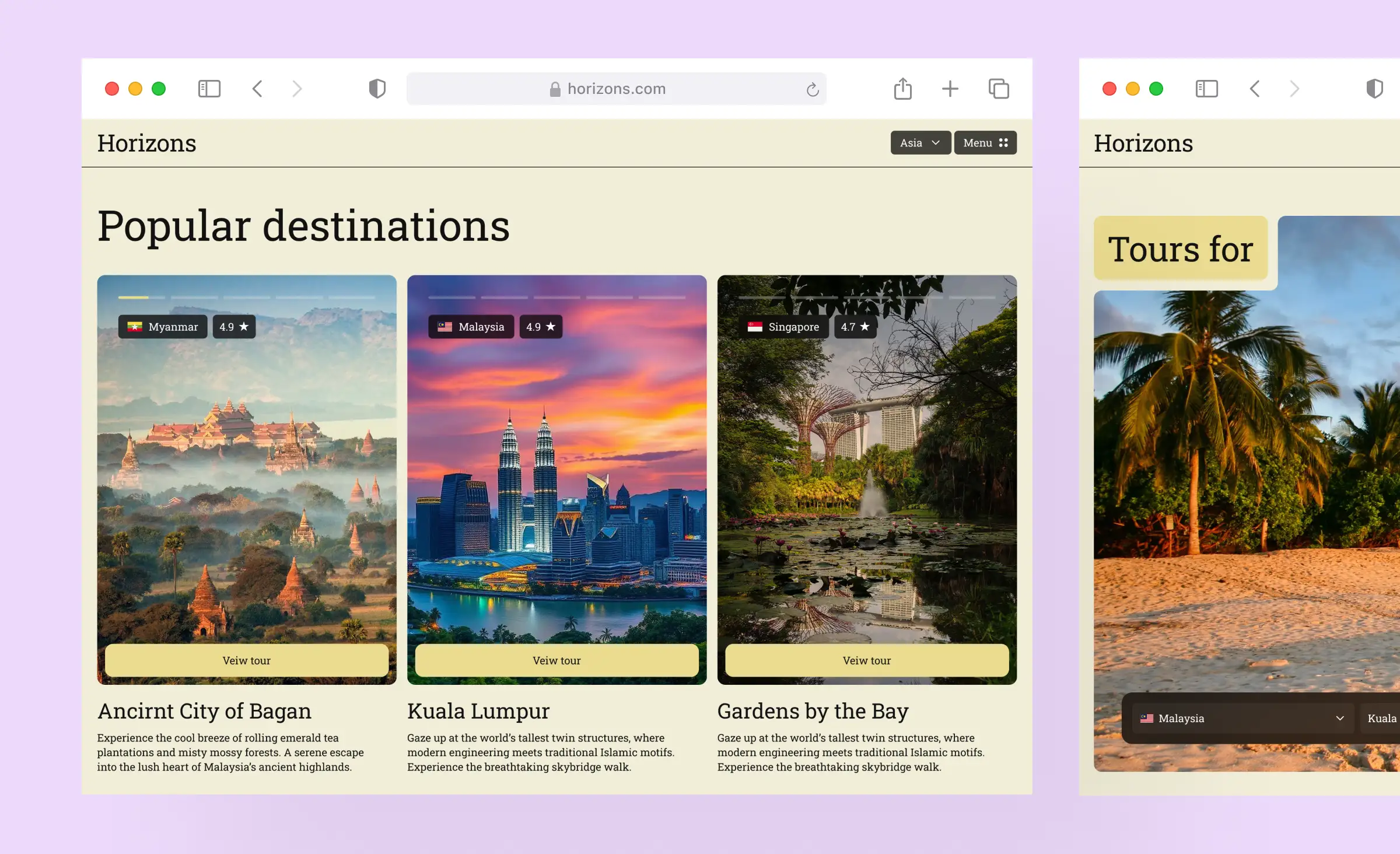
Design for devices, contexts, and flexibility
Accessible design adapts to every screen. Build responsive web design and improve mobile accessibility so your content remains clear and usable no matter what device someone is using. As part of modern digital product design, ensure layout and visual cues are flexible enough to support users on phones, tablets, and desktops.
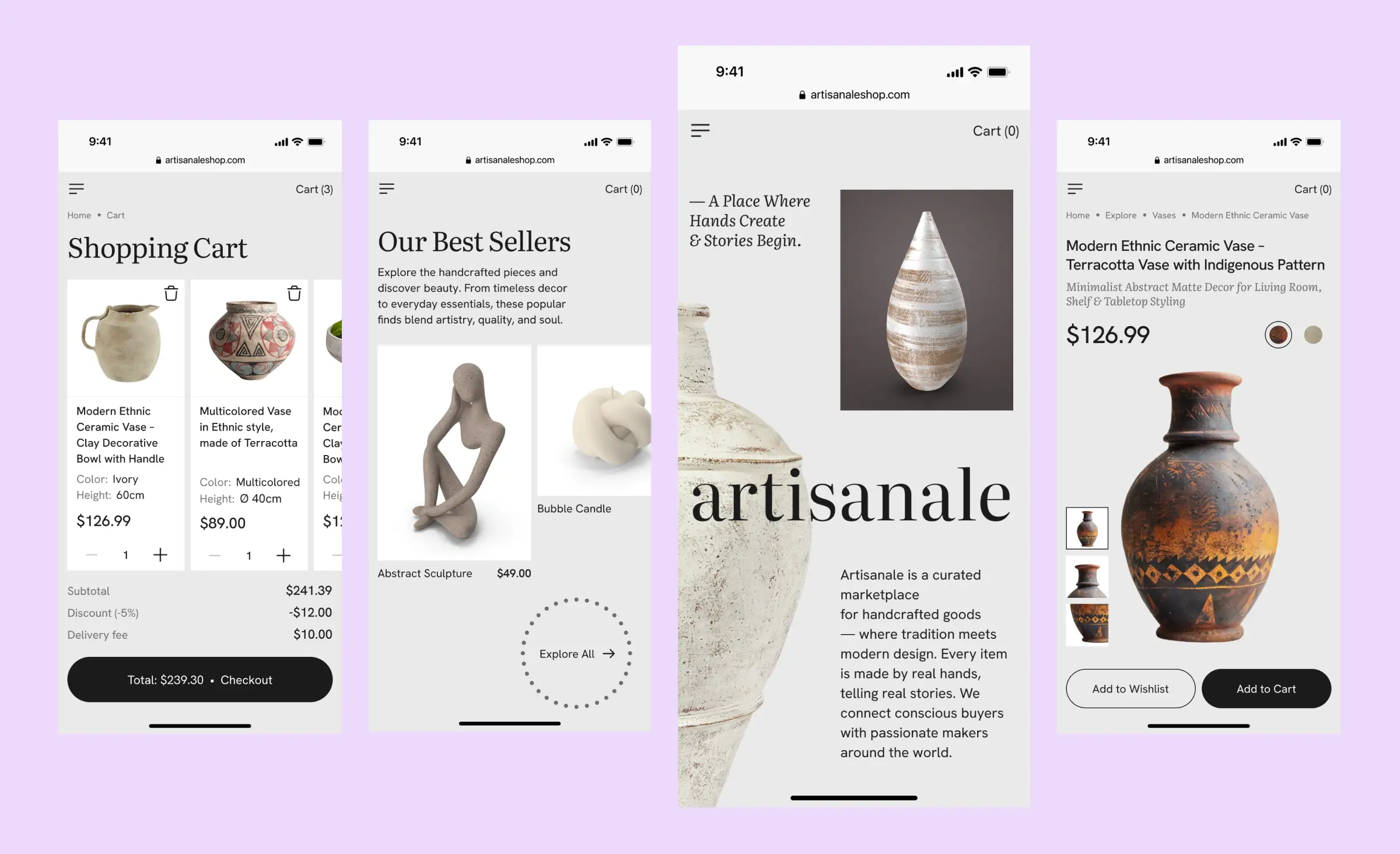
Use semantic and user-centered markup
Well-structured, meaningful code — like using semantic HTML for accessibility — improves how all users (and technologies) interpret your content. Combined with user-centered design accessibility, this helps everyone find information and complete tasks with ease.
Review, test, and improve
Continuously follow web accessibility guidelines, test with real users when possible, and look for ways to enhance UI/UX accessibility at every stage. By putting these inclusive UX best practices at the heart of your process, you build digital spaces that truly design for everyone.
Actively applying these methods to your UI/UX design and digital product design process ensures a stronger, friendlier experience for all — and sets your business apart as an accessibility leader.
Implementation — from design to frontend development
Turning accessibility principles into real-world results starts with careful planning and teamwork. Integrating accessibility into every phase of your web design, UI/UX design, and product design process is crucial for building digital products people of all abilities can use.
Embedding accessibility in the design process
Begin each project by applying inclusive design principles and inclusive UX best practices from wireframes to final screens. Every choice in UI/UX design — from text size to color contrast — should reflect the needs of real users. Aim for a data-driven design approach, informed by accessibility audits, user research, and usability testing.
Focus on UI/UX accessibility at the earliest stages to avoid issues later. Clear layouts and logical navigation set the stage for both great user experience and high website usability.
Developing for accessibility: From code to components
During frontend development and web development, code structure matters just as much as appearance. Use semantic HTML for accessibility to help assistive technologies interpret your content accurately. Adding the right ARIA roles and attributes helps, but always use ARIA only when native HTML elements won't do the job.
Pay special attention to UI components accessibility — make sure buttons, menus, and form inputs work with both mouse and keyboard, and provide appropriate labels and feedback. Be sure your implementation supports screen reader compatibility and allows full keyboard navigation web for users who cannot use a mouse.
Staying true to standards
Throughout the build, check your work against WCAG compliance web, web accessibility guidelines, and recognized digital accessibility standards. By doing so, every feature — big or small — contributes to accessible web design.
Ensure your designs adapt smoothly through responsive web design and remain usable on every device, supporting mobile accessibility for users on the go.
Testing and iteration
Make testing for accessibility a regular part of your workflow. Use automated tools and manual testing to catch issues with navigation, forms, and structure. Test with assistive technologies, like screen readers, and gather feedback from people with real-world accessibility needs whenever possible.
A truly great accessible experience is the result of ongoing attention, cross-team collaboration, and commitment to improvement — across design, frontend development, web development, and digital product design.
By making inclusion a habit at every stage, you build digital products that exceed compliance, strengthen your brand, and provide a better user experience for all.
Strategic and business value of accessibility
Accessibility is more than a technical requirement — it's a smart business strategy. By making your digital products and services available to everyone, you unlock new opportunities for growth, innovation, and customer loyalty. In this section, we'll explore how accessibility drives digital transformation, broadens your audience, boosts SEO, and delivers measurable value across different industries.
Accessibility's role in digital transformation
Accessibility is now a driving force behind successful digital transformation. As organizations adapt to new technologies and changing user expectations, including accessibility in web design, UI/UX design, and overall product design is essential. An accessible website or app shows that your business values inclusion and keeps pace with the modern digital landscape.
Expanding reach: Usability for all users
Focusing on usability for all users does more than meet basic needs — it expands your potential audience. When you implement inclusive UX best practices and inclusive design principles, your digital product design becomes more inviting and easier for everyone to use. This improved user experience can lead to higher customer satisfaction and broader market adoption, ensuring your services reach people of all abilities and backgrounds.
Accessibility as an SEO optimization strategy
Accessible sites often enjoy better visibility in search engines. Following WCAG compliance web and web accessibility guidelines leads to clearer code, more semantic markup, and well-structured content — all of which support stronger SEO optimization. We've already covered the topic of SEO optimization in the section on digital transformation, but here's how accessibility can help with it strategically:
Semantic markup improves crawlability and content comprehension.
When headings, landmarks, and ARIA roles are used correctly, they create a clear document hierarchy that both assistive technologies and search engine crawlers can interpret effectively. Proper use of <h1> to <h6> tags, <nav> and <main> landmarks, and descriptive link text helps Google understand the page's structure and topical relevance, improving indexation quality.
Alternative text and media descriptions improve keyword density and contextual relevance.
Alt attributes for images, transcripts for audio, and captioning for videos not only make content accessible but provide valuable metadata that strengthens keyword targeting and contextual associations. This allows search engines to surface multimedia content in image and video results, increasing SEO optimization by organic visibility.
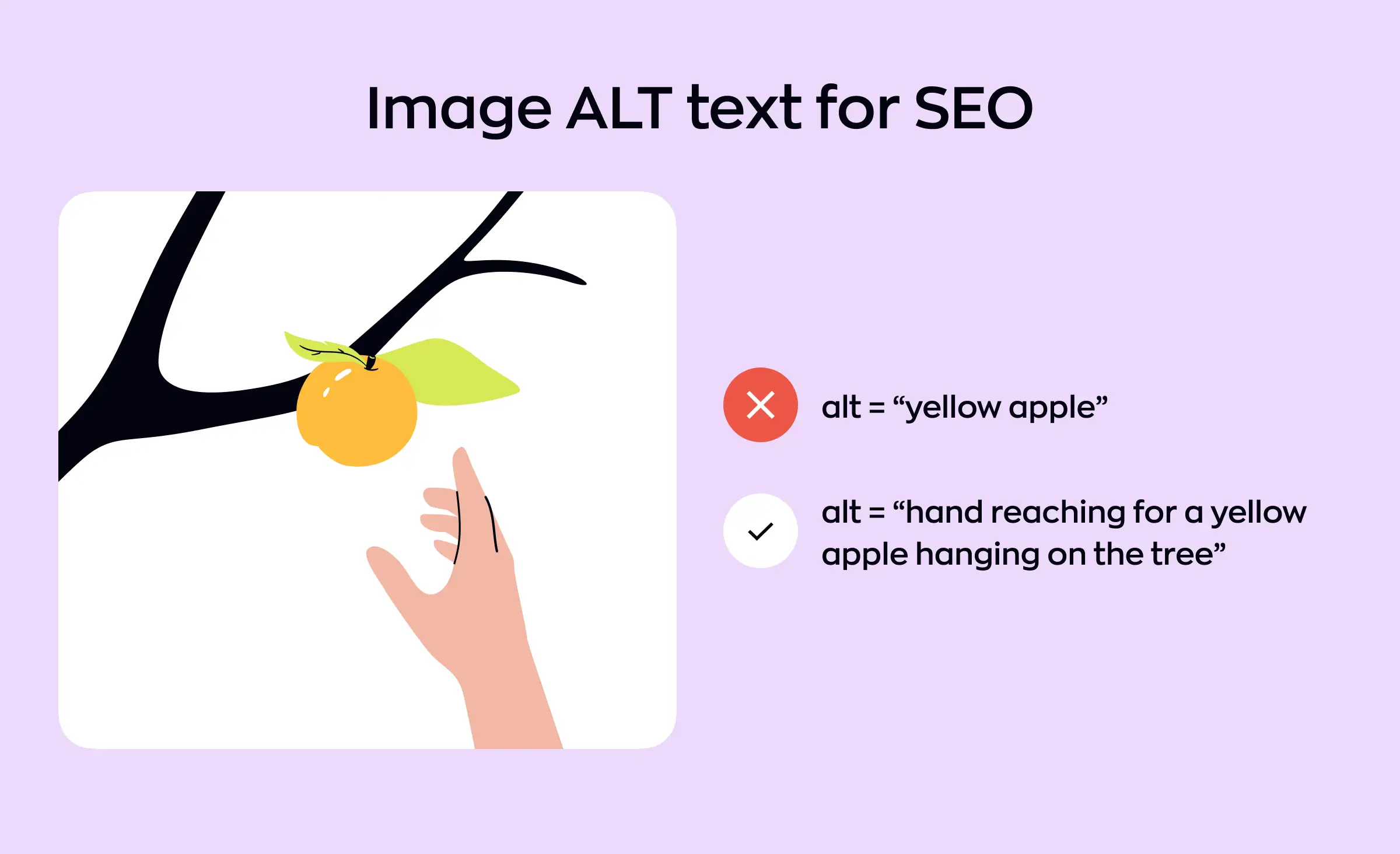
Example of good alternative text, providing visually impaired people with full comprehension of image Logical navigation and accessible components improve user signals.
Consistent, keyboard-operable menus and logical tab orders reduce friction for all users, leading to higher engagement metrics — such as time on page, click-through rate (CTR), and dwell time. Because modern search algorithms incorporate behavioral signals into ranking models, accessible navigation indirectly boosts SEO performance through improved usability and reduced bounce rates.
In essence, accessibility translates to technically optimized websites: clearer code, enhanced metadata, and stronger user engagement — all of which reinforce SEO optimization and drive long-term search visibility.
Businesses that embrace accessibility set themselves up for long-term growth, a stronger brand, and meaningful connections with every user. Making inclusion a strategic priority in web development is not only the right thing to do — it's also the path to sustained success in a rapidly evolving digital world.
Legal and compliance considerations
Following legal requirements accessibility is now a critical part of any digital project. Many countries and regions have enacted laws that require both public and private organizations to ensure their websites are usable by people with disabilities. Ignoring these regulations can result in lawsuits, fines, or the forced rebuild of your digital properties.
What laws and standards apply?
Globally, web accessibility guidelines such as the Web Content Accessibility Guidelines (WCAG) set the benchmark. In the European Union, the European Accessibility Act and the Web Accessibility Directive require most public-sector websites to reach at least WCAG 2.1 Level AA. In the United States, ADA lawsuits related to web accessibility have continued to increase, and courts frequently reference WCAG as the standard for compliance.
Across the web, digital accessibility standards such as WCAG are not just recommendations — they shape legal expectations. For organizations, staying up to date on WCAG compliance web and following recognized best practices is essential for risk management.
Compliance is a shared responsibility
Providing accessibility is not just the job of one team or role. It requires close collaboration between UI/UX design, web development, and frontend development teams, each bringing their expertise to meet legal requirements accessibility. Applying inclusive design principles and focusing on UI/UX accessibility from the start makes compliance much more manageable and cost-effective.
The real-world impact
According to the 2025 WebAIM Million study, more than 39% of websites had skipped heading levels, which can create significant barriers for users and may put organizations out of step with accessibility laws. Even basic issues — such as missing form labels or insufficient color contrast — are common forms of noncompliance found in audits.
Staying proactive
Proactively following WCAG compliance web and current digital accessibility standards protects your organization from legal challenges and demonstrates social responsibility. When accessibility is built into your web design and development process, you create products that serve all users — and stand up to legal scrutiny.
Making accessibility a priority is not just about avoiding penalties. It is about showing your commitment to inclusion and strengthening your digital reputation from the start.
How can Ronas IT help?
Ronas IT specializes in creating digital solutions that prioritize everyone's experience. Our team has extensive expertise in developing websites with a strong focus on accessible web design, ensuring all users can easily interact with your platform regardless of their needs or device. By applying the latest UI/UX accessibility practices, we design interfaces that eliminate barriers and support smooth navigation for users of all abilities.
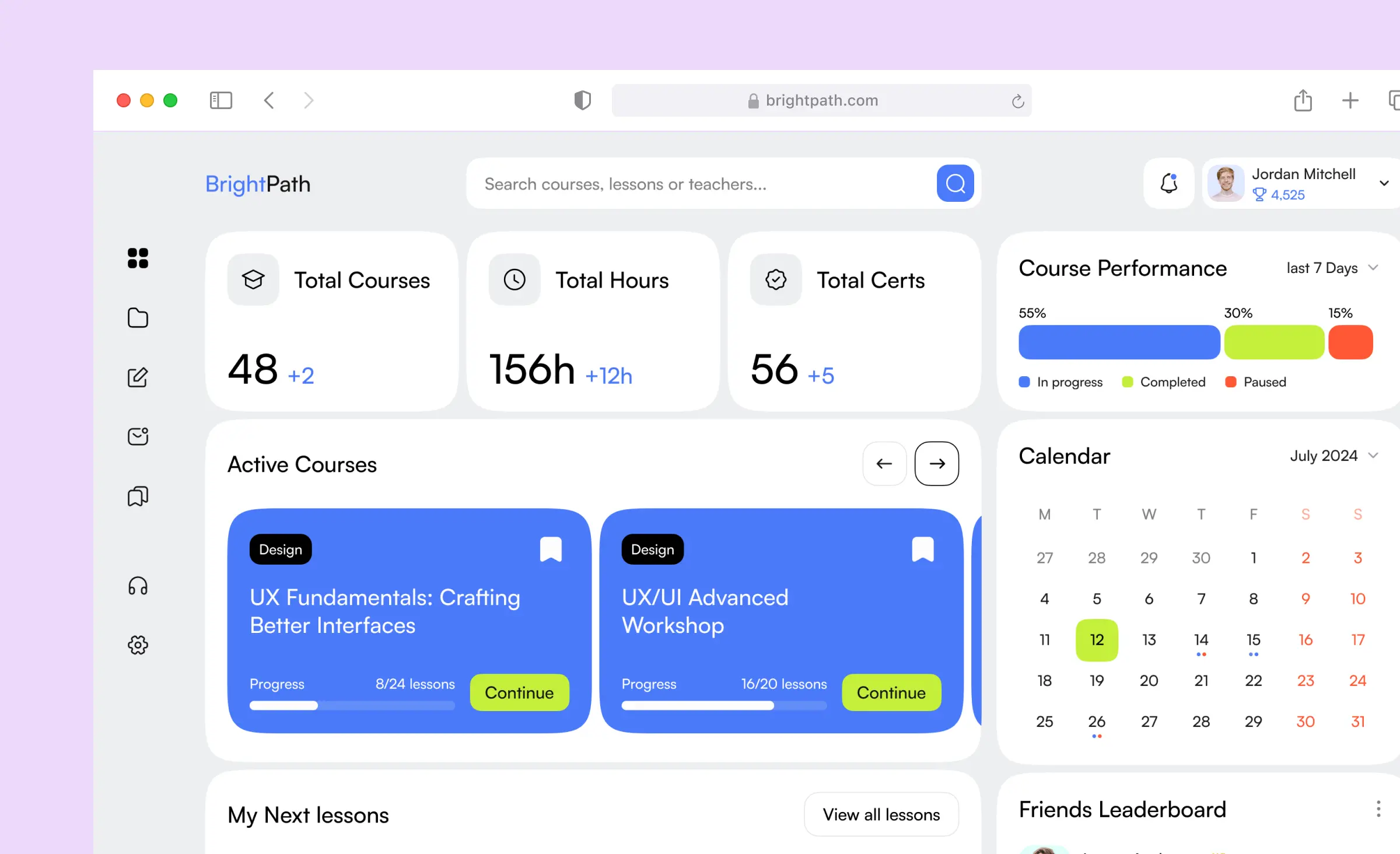
We understand the importance of website usability and build each project to deliver clear, intuitive journeys. Our approach guarantees that every page on your site works efficiently, looks great on any screen, and adapts seamlessly for people on the go through meticulous mobile accessibility and responsive web design. With Ronas IT, your organization can offer digital products that are not only visually appealing but also genuinely inclusive, opening your services to a wider audience.
Conclusion and next steps
Designing for web accessibility and WCAG compliance is no longer just an option — it's expected for any modern website or digital product. By embedding web accessibility guidelines, inclusive UX best practices, and clear legal requirements accessibility into your UI/UX design and web development process, you create digital experiences that are usable by everyone. These investments support business goals, boost SEO, and open your services to a wider audience.
Now is the time to move from awareness to action. Start by auditing your site against key standards like WCAG, address common issues — such as headings, labels, and color contrast — and involve your whole team in the accessibility journey. Collaboration across design, development, and management will keep your work future-proof and fully compliant.
By embracing accessibility at every stage, you not only meet legal and ethical standards — you set your organization apart as a leader in creating products that truly work for all. Ready to take the next step? Fill out a short form below to start your web development journey with our team.
Related posts









Related Services


Development
React Native App Development Services


Development
MVP Development Services


Development