Interactive prototypes and user testing: Validating ideas before development

Every successful digital product and UX research starts with a simple question: will real users find it valuable? The best time to answer it is before you write a single line of code. That's where interactive prototypes and user testing come in. By exploring these UX research methods early in the UI/UX design process, teams gain direct insight into how people will engage with their ideas.
Prototyping and user experience testing at this stage isn't just about catching problems. It sets up fast, early feedback loops with real users, so creators can learn what works and what doesn't. This approach does more than prevent missteps — it drives smarter product idea validation, helps focus resources, and often means saving development costs that pile up when issues go unnoticed until late in the process.
In this article, we'll look at the real user testing benefits that result from involving people into the UI/UX design process from the start. We'll cover how early user experience testing methods keep teams on track, avoid waste, and lead to better, more usable digital product design. The journey begins with understanding the roles prototypes play in shaping what you build next.
The role of prototypes in the UI/UX design process
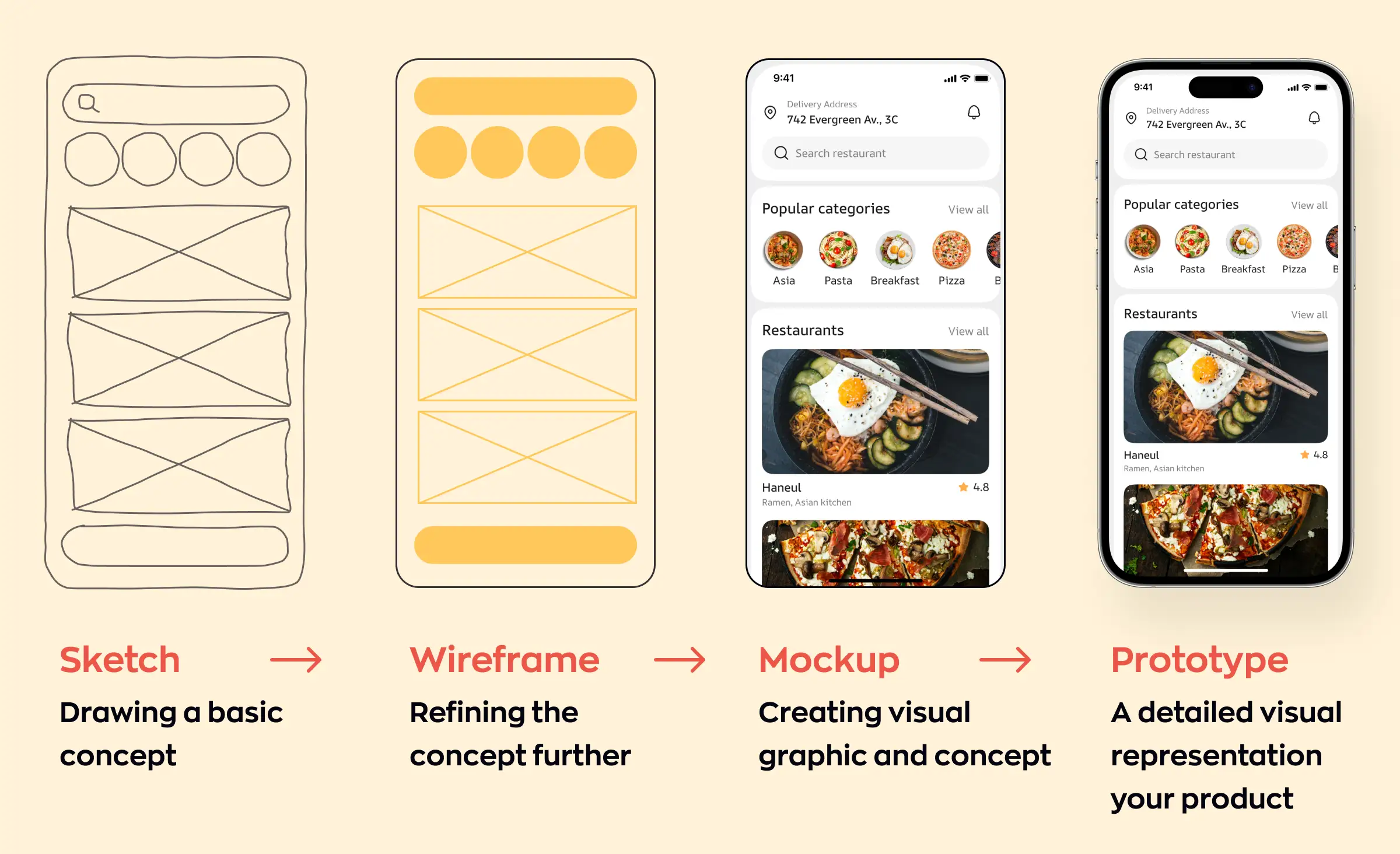
Turning ideas into working models is one of the most important steps in digital product design. Moving from concept design to something users can click or tap offers a real sense of how an experience will take shape.
Why prototyping matters
Interactive prototyping allows teams to move well beyond simple design wireframes, adding true behaviors and natural flow to their work even at the earliest stages of product development lifecycle. With a working model, it becomes much easier to run quick user experience testing, spot problems early, and make fast changes before the real-life MVP validation.
Prototyping across platforms
Every project faces choices about where and how users will interact with their product. Whether the goal is mobile app prototyping or web app prototyping, having the right design tools for prototyping unlocks seamless creation of interactive screens — with no need for extensive coding. Building and testing prototypes for both mobile and web platforms helps teams see how features and navigation translate for different devices, leading to digital product design solutions that work everywhere.
Supporting the UI/UX design process
Early prototypes bring major user testing benefits by making usability testing methods simple to apply and feedback easy to gather. Each round of UX research during this stage highlights points of friction and guides focused improvements, so every update within the agile development approach genuinely addresses real user needs.
A clear prototype is the best way to make sure your idea works for real users. When you validate a prototype and surface any usability issues now, the entire product development lifecycle becomes smoother — saving both time and resources. In the next section, we'll dig into describing the tangible user testing benefits.
Key user testing benefits in product development
Bringing users into the process is one of the best moves you can make for digital product design and supporting agile development within your organization. Real feedback at the right time shapes products that people actually want and need.
Why user experience testing matters
User testing benefits teams in many ways. The most obvious: you catch usability issues before launch. Early feedback loops mean that small problems never become big ones, which is key in the UI/UX design process. These rapid insights speed up design validation and give confidence to move forward with each new iteration.
What you gain from involving users in the product development lifecycle
- Prototype validation helps to make sure that your concept works in practice, not just in theory.
- User experience testing helps refine the interface and user flows, shaping a more user-centric design.
- Regular testing, especially as part of agile development, keeps the whole product development lifecycle focused on solving real user needs.
- Early rounds of testing are central to product idea validation, reducing the risk of wasted time or effort.
- When teams test MVPs often, they get much-needed clarity on MVP validation and product-market fit validation.
Cost and time saving
Testing with users before building helps in saving development costs. Each round of usability testing methods and user feedback means costly rework is less likely. By learning what works and what doesn't, teams avoid building features no one needs.
At the end of the day, user testing benefits both your agile development process and your product. It helps find focus, saves time, and clarifies ideas before investments grow. Next, let's break down the practical usability testing methods that unlock these results.
Usability testing methods: Gathering actionable insight
Gaining real user perspective requires more than guesswork. Today's usability testing methods help product teams gather feedback and translate it into better digital experiences.
Common usability testing methods
Moderated tests
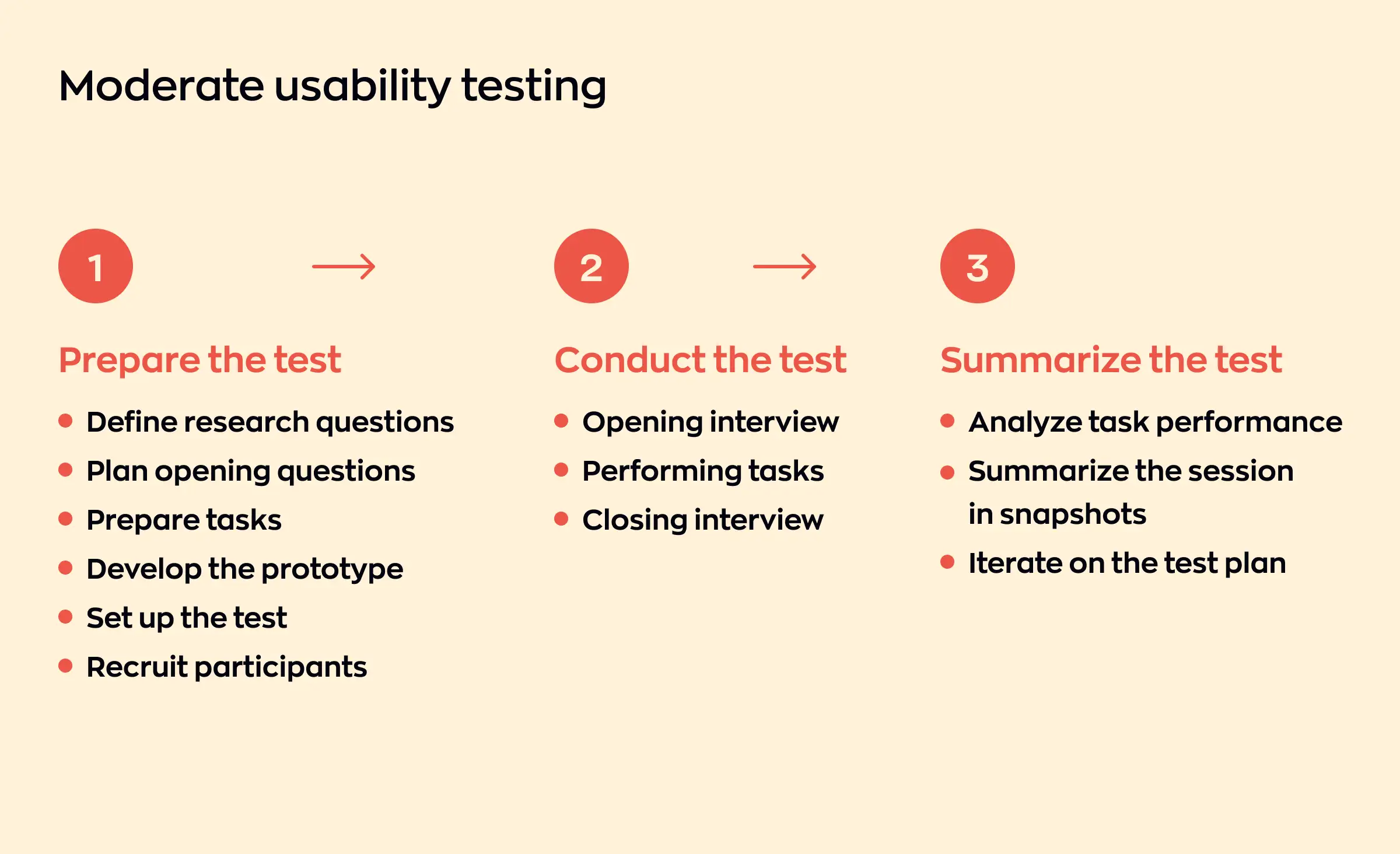
In moderated usability tests, a facilitator walks users through a set of pre-defined tasks while observing their actions and listening to their thought process. This real-time guidance gives teams the chance to spot exactly where users run into trouble or breeze through. It also allows for immediate follow-up questions, so teams can dig deeper when they notice confusion or hesitation.
Remote user testing
Remote user testing connects teams with participants from diverse locations and backgrounds. Users can join these tests from their homes or workplaces, using their own devices and familiar setups. This real-world context often reveals usability issues unique to different environments that in-office testing might miss. Plus, remote formats make it easy to get quick feedback from a broader audience.
A/B testing design
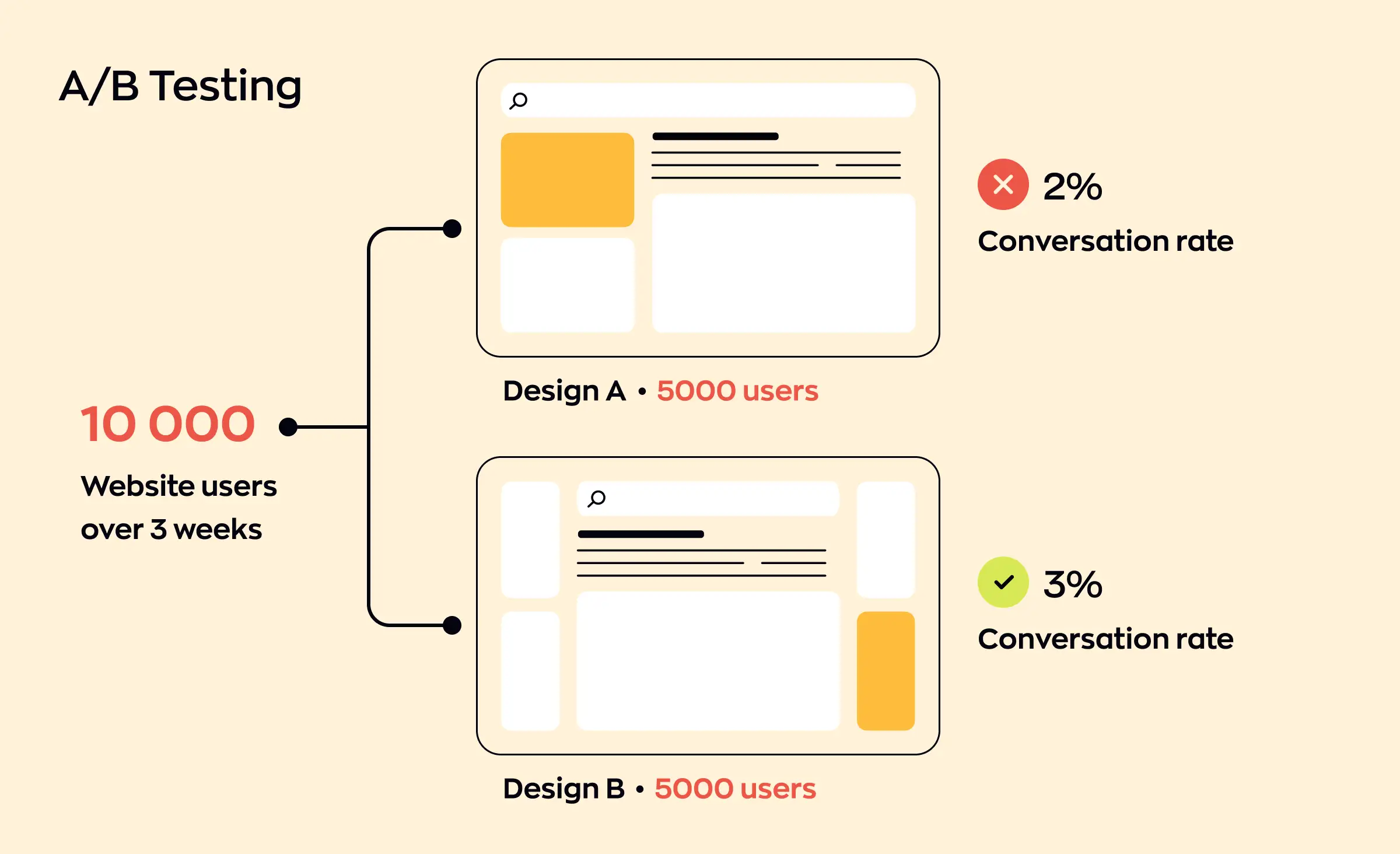
A/B testing design involves showing different versions of a feature, page, or flow to separate groups of users and comparing the results. This method provides hard evidence about which design performs better in terms of goals like conversions, task completion, or engagement. It's especially valuable when validating the choices behind an MVP or before rolling out changes to a wider audience.
Surveys and interviews
Surveys and interviews are direct ways to gather user opinions, uncover pain points, and understand expectations. Surveys collect responses from many users at once, giving a solid overview of trends and attitudes. Interviews are more personal, offering the chance to ask detailed questions and get in-depth feedback that might not emerge from simple questionnaires.
Session recordings
Session recordings capture real users navigating through a product, providing unfiltered insight into how people interact with each screen and element. By watching these recordings, teams pick up on hidden frustrations, navigation patterns, or stumbling blocks that users might not mention in surveys or interviews. This strategy complements other UX research methods and often brings unexpected issues to light.
Benefits of flexible testing
Using a mix of usability testing methods throughout the UI/UX design process leads to better outcomes for teams and users. Every new round of user experience testing offers a different set of insights, making it easier to find and fix usability issues as they come up. Integrating interactive prototyping at this stage strengthens design validation, since feedback comes straight from the people who matter most — the users themselves. When teams apply what they learn to their evolving MVP, they set a strong foundation for future releases and ongoing product success. These practices are more than habits; they are a core part of any modern design strategy and agile development.
Embedding testing into strategy
Teams that build regular feedback into their routines set themselves up for long-term progress. Relying on strong UX research and following UI/UX best practices creates consistency as projects move through the product development lifecycle. With this approach, designers turn findings into real improvements, and each iteration brings the product closer to what people need in daily life.
Up next, let's look at how interactive prototyping connects these research lessons to practical solutions in both mobile and web app development.
Interactive prototyping for mobile and web apps
Prototyping is the heart of modern digital product design. When teams use interactive prototyping, they transform ideas into working models that feel like finished products. For both mobile and web app development, this hands-on approach uncovers what works and what needs tweaking — long before launch.
Building prototypes for every device
Mobile app prototyping lets designers spot issues specific to touchscreens, gestures, and varied device sizes. Testing flows on phones and tablets reveals friction and helps with product idea validation at an early stage. At the same time, web app prototyping addresses how the interface performs on different browsers and screen widths. Both paths help to make sure that user experience testing reflects real-life scenarios.
Teams choose from a growing set of design tools for prototyping. These tools allow for clickable journeys, transitions, and feedback without the heavy lift of writing code. Picking the right tools depends on the design strategy, platform, and unique project goals.
The list of the most popular prototyping tools
Figma, ProtoPie, Framer, and Axure RP top the list for interactive prototyping.
- Figma: Real-time collaboration, advanced animations, and micro-interactions for seamless team workflows.
- ProtoPie: Complex gestures, conditional logic, and code-free high-fidelity simulations.
- Framer: Code-like interactions, React integration, and responsive web prototypes.
- Axure RP: Dynamic content, variables, and enterprise-scale interactivity with reusable components.



Connecting validation and improvement
Interactive prototyping does more than show how a feature might look. It forms the backbone of prototype validation and design validation, confirming whether an idea actually delivers value. Each iteration gives direct answers through user testing benefits, like easier identification of usability issues and quick, low-cost changes.
Embedding usability testing methods and ongoing UX research at this stage of the product development lifecycle enables better UI/UX design process control. Insights gained here speed up progress, help teams build the right features, and reduce risks before development scales.
Effective prototyping is an investment in both quality and collaboration. As teams continue, taking these lessons forward means every decision is grounded in real feedback. Next, we'll see how integrating continuous user feedback improves designs with each new agile development round.
Integrating user feedback for design validation
No product moves in a straight line from idea to completion. The best results come from listening, adapting, and learning. That's where early feedback loops become essential in digital product design. By gathering reactions during every step of the UI/UX design process, teams turn real opinions into smarter decisions.
Turning feedback into progress
Incorporating user feedback into agile development isn't just about collecting comments — it's about shaping the entire design strategy. Design sprints and agile development speed up delivery, but their true value comes from validating choices with real users. Building early feedback loops into these workflows catches usability issues before they grow, so that changes are based on evidence, not just assumptions.
Interactive prototyping and regular user experience testing make these cycles flow smoothly. By treating every user session as a chance to learn, teams discover new user testing benefits with each round. As insights build, they guide decisions in a user-centric design direction. This method keeps projects flexible, even as they scale.
Methods for real-world validation
Teams combine a range of usability testing methods and MVP validation tools to dig deeper into how people actually use their products. Strong UX research highlights weak spots while confirming what works, building confidence ahead of launch. The design thinking process encourages teams to keep asking — and keep improving — based on honest answers.
When feedback leads to design validation, projects move faster and smarter. Change happens for a reason. Every tweak or feature is tied back to a direct user need, creating digital product design that fits real life.
Adopting this cycle as a habit means each stage of development delivers more value than the last. Next, let's see how this ongoing feedback shapes the big picture throughout the entire product development lifecycle.
Scaling up: Keeping progress steady
Reaching your product's true potential means thinking far beyond first launch. Each stage in the product development lifecycle brings chances to learn, improve, and scale. To keep progress steady, successful teams rely on clear strategies and feedback at every turn.
Steps for scaling product success
Start with solid concept design
Laying a strong foundation begins with thoughtful concept design, shaped by user-centric design and UX research. The UI/UX design process should always aim to uncover real needs and guide digital product design from day one.
Embrace interactive prototyping
Build, test, and refine using interactive prototyping. Whether focused on web app prototyping or mobile app prototyping, using the right design tools for prototyping helps teams visualize and adjust features fast.
Test and validate at every stage
Regularly schedule user experience testing and usability testing methods. Prototype validation and design validation ensure teams catch problems early. Gathering input doesn't stop after the first test; UX research methods support iteration as products grow.
Refine with evidence, not guesswork
Agile development keeps projects flexible, while product-market fit validation confirms you're solving the right user problems. Rely on user testing benefits to make data-driven choices and shape your design strategy as market needs change.
Follow UI/UX best practices throughout
Consistency matters when scaling. Applying UI/UX best practices, listening to feedback, and integrating continuous user input into the product development lifecycle lead to stronger outcomes and happier users.
Interactive prototyping ties every one of these steps together, bridging gaps between ideas, features, and real user impact. With this approach, your team moves through the product development lifecycle with clear goals, proven results, and room to grow. Next, we'll close out with a look at how early validation can set your products — and your business — up for long-term success.
Conclusion: From idea to impact — testing before building
Every successful product starts with a clear understanding of what users need. Interactive prototypes and user testing give teams a safe space to test, learn, and improve before the real work of building begins. These steps are more than helpful — they're essential for smart digital product design and a strong UI/UX design process.
Early feedback loops from user experience testing and usability testing methods make it easier to catch what isn't working. The payoff is real: saving development costs and avoiding costly changes after launch. When teams invest time in prototype validation and continuous design validation, they end up with results that last.
Relying on UX research, interactive prototyping, and flexible design tools for prototyping brings new ideas closer to reality, faster. At every stage, UI/UX best practices and agile development keep teams focused and able to adapt when something unexpected comes up.
A culture of testing and iterating doesn't just protect your resources — it puts your product in the best position to succeed. With every round of testing and refinement, user testing benefits become clearer, from happier users to smoother releases.
Build on what you learn, lean into strong research, and trust the process. When you validate ideas early, you make room for real impact — one step, one test, and one insight at a time.
If you need a reliable partner to create your product's UI/UX design, fill out the short form below and we'll get back to you soon. You can also check out examples of our work.
Related posts







Related Services
Development
React Native App Development Services
Development
MVP Development Services
Development