
Mobile app maintenance services keep a released app available, secure, and publishable. In practice that means monitoring the production environment, patching dependencies and security holes, keeping the build compatible with current iOS and Android requirements, shipping the releases the stores demand, and keeping cloud spend proportionate to real traffic. It is ongoing operational work on a product that already exists, priced monthly rather than per project.
That definition matters because most articles on this topic quietly fold new features, redesigns, and analytics into “maintenance” and then quote one blended price. At Ronas IT, mobile maintenance starts at $1,000 per month for a subscription with predictable scope, or $50 per hour on Time and Materials if you would rather not commit to a plan, and scales up to $5,000 per month for a full technical support plan or $15,000 per month for enterprise response times. The $5,000 and $15,000 figures are always on our pricing page. The rest of this article covers what the stores force you to do even in a quiet quarter, where the line between support and development sits, and how our team runs post-release support day to day.
What mobile app maintenance services include
Five workstreams cover almost everything a maintenance contract should do. They are deliberately narrow: each one is measurable, and none of them changes what your product does.
- Availability monitoring. Watching the production environment and its components, with automated alerting so a problem is detected rather than reported.
- Component and OS-compatibility updates. Keeping runtimes, libraries, and SDKs current so the app keeps working as iOS and Android change underneath it.
- Security patching. Applying security updates across the infrastructure and dependency tree, and reviewing access rules as the team changes.
- Store-compliance releases. Rebuilding and resubmitting when Apple or Google raise the minimum requirements, including the declarations each store now asks for.
- Cost control. Rightsizing infrastructure so you stop paying launch-day capacity for steady-state traffic.
Everything else that gets sold as maintenance, such as new features, redesigns, and experiment programs, is product development. It is legitimate work and we do plenty of it, but it belongs in a different budget line with a different decision process.
Store deadlines that force an app update even when you ship no new features
An app with zero roadmap still needs releases, because Apple and Google keep raising the requirements on their own schedule, whether or not you ship anything new. The table below lists what is already in force and what is landing soon on each store.
| Requirement | Store | Date |
|---|---|---|
| New apps and app updates must target Android 16 (API level 36) or higher; an extension to November 1, 2026 can be requested | Google Play | August 31, 2026 |
| Existing apps must target Android 15 (API level 35) or higher to stay available to new users on newer Android releases | Google Play | August 31, 2026 |
| Uploads must be built with Xcode 26 or later using the iOS 26 SDK | App Store | In force since April 28, 2026 |
| Updated age rating answers required to keep submitting updates | App Store | In force since January 31, 2026 |
| Trader status required for EU distribution under the Digital Services Act; apps without it are removed in the EU | App Store | In force since February 17, 2025 |
| Approved reasons for required-reason APIs. Privacy manifests, and signatures for binary dependencies, are required for every SDK on Apple's list whenever you submit a new app or an update that adds one of them | App Store | In force since May 1, 2024; the SDK rule applies per submission, with no separate deadline |
Sources: Google Play target API level requirements and Apple upcoming requirements. Both pages change, so treat any date you read anywhere, including here, as a prompt to check the primary source before you plan a release.
Two consequences are worth stating plainly. First, missing a target API level does not produce an error message; it quietly narrows who can install your app. Google Play states that apps below the required level remain available only on devices running the same or an older Android version, which reads as a slow decline in installs rather than an outage. Second, an unmaintained toolchain removes your ability to react. If your project cannot build with the SDK the store currently accepts, you cannot ship an urgent fix on the day you need to.
What maintenance is, and what it is not
Support starts when a client is satisfied with the product and wants it to keep running reliably. Production bug fixes within the agreed scope are maintenance. Performance audits, remediation backlogs, and new features are development. This is where our position differs from most vendors, and it is worth being blunt about it.
“Support means the client told us they are happy with the product and want it to keep working. So we watch that the app and the site stay available, and we optimize infrastructure so the client does not overpay. Once you ask us to change what the product does, that is development, and it should be planned and paid for as development. Blending the two is how teams end up with a monthly invoice nobody can explain.”
Evgeny Leonov, CTO at Ronas IT
The practical benefit of drawing that line is a predictable bill. When compatibility releases, security patches, and monitoring sit in a fixed monthly plan, and feature work sits in a separate development agreement, you can cut the roadmap in a slow quarter without putting the app's availability at risk. When everything is one blended retainer, the first thing that gets postponed under budget pressure is usually the invisible work that keeps you in the stores.



How much do mobile app maintenance services cost?
For mobile apps specifically, a maintenance subscription with predictable scope starts at $1,000 per month. Beyond that entry tier, ongoing technical support starts at $5,000 per month and covers availability monitoring, infrastructure optimization, incident response, and preventive updates. Enterprise support with the same scope and tighter response expectations starts at $15,000 per month. If a monthly plan is more structure than you need, DevOps work is available from $50 per hour. Those figures are always on our pricing page, which is the figure to trust if it ever disagrees with an article.
What moves you up that range is not app size in screens. It is the number of moving parts somebody has to watch:
| Cost driver | Why it changes the price |
|---|---|
| Number of environments and services | A single container and a managed database cost far less to watch than a set of services with queues, caches, and background workers |
| Third-party integrations | Every payment provider, analytics SDK, and external API is a dependency that can change its contract without asking you |
| Response expectations | Business-hours response and round-the-clock incident coverage need different staffing, which is the main gap between our standard and enterprise plans |
| Regulatory scope | Products in fintech or healthcare carry recurring compliance work that a content app does not |
| Code quality you inherited | Maintenance means regularly changing the code: dependency bumps, OS-compatibility updates, and security patches all touch it. Poorly structured code without tests makes each of those changes expensive, and sometimes makes a rebuild cheaper than support |
That last row is not hypothetical. We once studied a client's mobile application with SonarQube and IntelliJ IDEA and found that the volume of test code needed to monitor bugs safely would cost more than rebuilding the app. We said so. Clear code and early performance work are what keep maintenance affordable later, which is an argument for spending well at the start rather than an argument against support.
Cost also tends to fall over time when someone is watching. Teams over-provision for the first release, then nobody revisits the cluster, and the client keeps paying launch-day prices for steady-state traffic.
“It's common for companies to over-provision for the first release and then never revisit it. Real advice: put a cluster-sizing review on the calendar for thirty days after launch, once you have actual traffic numbers instead of a launch-day guess.”
Evgeny Leonov, CTO at Ronas IT
Why post-release support pays for itself
Users read the update date
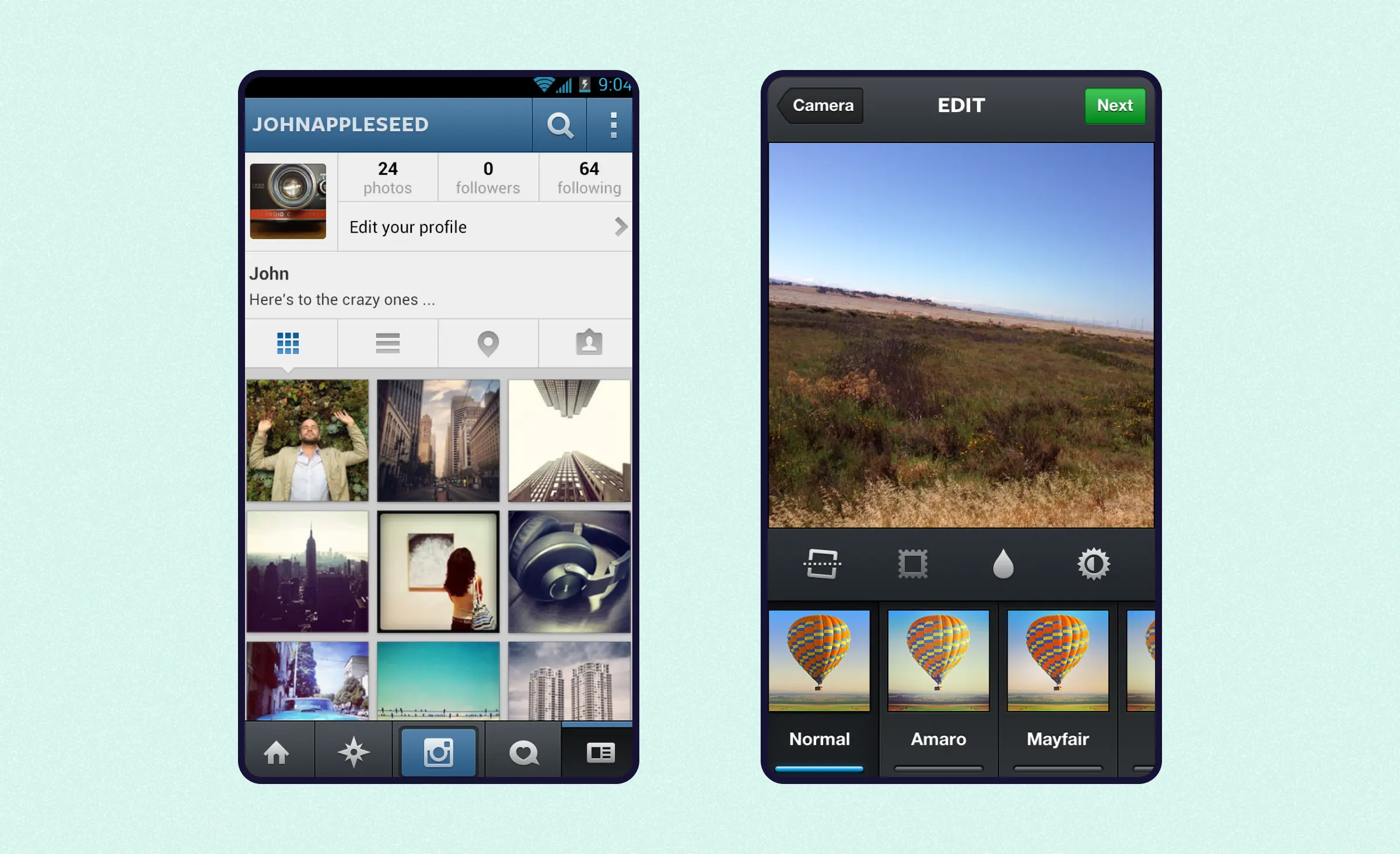
Both stores publish when an app was last updated, and a listing that has been untouched for a year reads as abandoned to anyone comparing options. The effect shows up in the interface too. An app that never changes ages visibly against the platform around it, the way a 2012 interface does today.
For Apple, this is more than a perception problem. Under its ongoing App Store Improvements process, apps that go three years without an update and pull in little to no downloads over a rolling 12 months get a removal notice, with 90 days to ship a fix before the listing comes down. A maintenance plan that keeps releases current is also what keeps an app eligible to stay listed at all.
Privacy failures cost you accounts
Weak data protection costs you users, on top of any legal exposure. In the 2024-2025 Public Opinion Research on Privacy Issues published by the Office of the Privacy Commissioner of Canada, 52% of respondents said they had deleted or stopped using an account because of privacy concerns. Backups, least-privilege access, and fine-grained access control are part of our routine maintenance work, so that even developers do not hold access they do not need. Our approach to security and privacy by design explains how those controls are set up in the first place.
Compliance keeps moving
Privacy laws such as GDPR and PIPEDA expect an application to stay designed for privacy, transparency, and user rights, not to pass one audit. SOC 2 and ISO 27001 address organizational controls rather than user rights. During maintenance that turns into recurring checks: where data is stored, whether consent flows still match the current policy, and whether export and deletion features still work after the last release. When rules or the product change, retention policies and consent management need adjusting, and support teams do that against requirements from the product owner or legal counsel rather than inventing them. The trader status requirement above is a good example of how fast a compliance change turns into a release deadline.
How mobile app maintenance differs from web app maintenance
Versioning
Web releases reach every user at once, because client and server both update on deploy. Mobile releases do not. You cannot make users install a new build, so the backend has to serve the old app and the new app at the same time. That is versioning, and it is the single biggest structural difference in the support scope.
“We've seen a meaningful slice of users still running a build from over a year ago, so we treat every API change as additive: keep the old response shape working, and only retire it once usage on that version actually drops to zero.”
Evgeny Leonov, CTO at Ronas IT
Update deployment
A web fix is a deploy. A mobile fix is a build, a store review, and then a wait for users to update. Plan for review time in any incident that needs a client-side change, and keep as much correctable logic as possible on the server, where you can still move quickly.
For the React Native and Expo apps we build, that wait is often shorter. Eligible fixes to the app's JS layer, such as UI copy, layout corrections, and content, ship as an EAS Update over the air, often within hours instead of the 1–7 days a store review usually takes. Anything that touches native code, including the store-compliance releases in the table above, still needs a full build and a real store submission.
Offline behavior
Not every mobile app needs to work offline, but enough are expected to that it shapes the support scope: restoring user state after a reconnect, synchronizing data, and handling local storage. Web apps can take this on too, through a PWA with a service worker doing the same job, but most do not bother, so a lost connection there usually just means a blank screen.
Optimization targets
Both platforms need performance work, but you watch different things. On mobile that is cold start time, dropped frames during scrolling and animation, battery drain, and memory use, especially on older devices. A memory leak that only slows down a browser tab can crash a phone outright. On the web it is Core Web Vitals such as LCP and INP, JavaScript bundle size, and caching. A slow first load costs you the visitor before they ever see the product.
Stack choices made at build time
Maintainability is decided during development, not after it. If code is hard to read and change, a later vendor may be unable to fix it at any sensible price. That is why every merge request goes through review against a written internal standard before it merges: single-purpose changes kept small enough to review properly, tests, and a checklist covering error handling, security, and readability, not just whether the feature works.
We also deliberately choose mainstream tools for the same reason. On the web that is Next.js for anything that needs SEO or server rendering, and plain React for client-only tools where search visibility does not matter; Laravel on the backend; and React Native for cross-platform mobile apps. A stack that many engineers know is a stack you can staff five years from now, including with a team that is not ours.
How Ronas IT runs mobile app maintenance
We deliver post-release support as DevOps Proactive Care, the part of our DevOps services built specifically for a product that is already live, as opposed to one still being built. Once the product releases, we move it into your infrastructure and keep watching it: production issues answered within 24 hours, every component kept current, security patched, and costs managed, backed by a help desk so requests do not queue behind one engineer. Because the code is built to run on Kubernetes rather than against a single provider, this works the same way on GCP, AWS, or Azure, though each provider needs its own configuration.
If we also built the product, this is a continuation, not a handoff. The GitLab, CI/CD, and monitoring we set up during development, what we call DevOps Fast Start and run across 60+ projects at a time, carries straight over, so nobody has to relearn the infrastructure. If your own team built it, we take over the same way, starting from whatever setup you already have.
Ronas IT has been shipping and supporting software since 2007 with a team of over 50 specialists, and we are a Google Cloud Partner, which is why a Google Cloud start is often the fastest path to a supportable environment.
What this looks like on real projects
On OddsCrowd, an app for sports bettors, support ran alongside development from the start: we kept the current version working, fixed bugs as they appeared, and released updates to the App Store and Google Play after every milestone. Release timing was planned around the game calendar: the client came to us 10 weeks before the Super Bowl, and every release had to land before kickoff. Sentry tracked production errors across app, website, and backend. On a fitness app we used the same approach, with Sentry for performance monitoring and proactive error tracking. On a locker admin platform, remote maintainability was the product requirement itself: firmware updates and diagnostics travel over a WireGuard VPN tunnel so the client's team can support any location without visiting it. And on Docky the client stayed with us to support the product after release, which is the usual pattern once a launch goes well.
The monitoring stack, briefly
A few tools do most of the work by default, and they are worth knowing by name because you will see them in our reports.
- Prometheus collects and stores metrics. Each server relies on local storage, so collection keeps working when other parts of the system do not, and its alertmanager handles notification routing and silencing.
- Grafana turns those metrics into dashboards. Dashboards can be shared, which means you can watch your own system rather than asking us for a status update.
- Loki aggregates logs. It indexes labels rather than log contents, which keeps it cheap to run and easy to scale, and it can raise alerts from log patterns through the same alertmanager.
- Sentry catches errors and crashes from the app itself, which is a different layer from infrastructure metrics: a clean Prometheus dashboard does not tell you the app is crashing for users on one specific device or OS version.
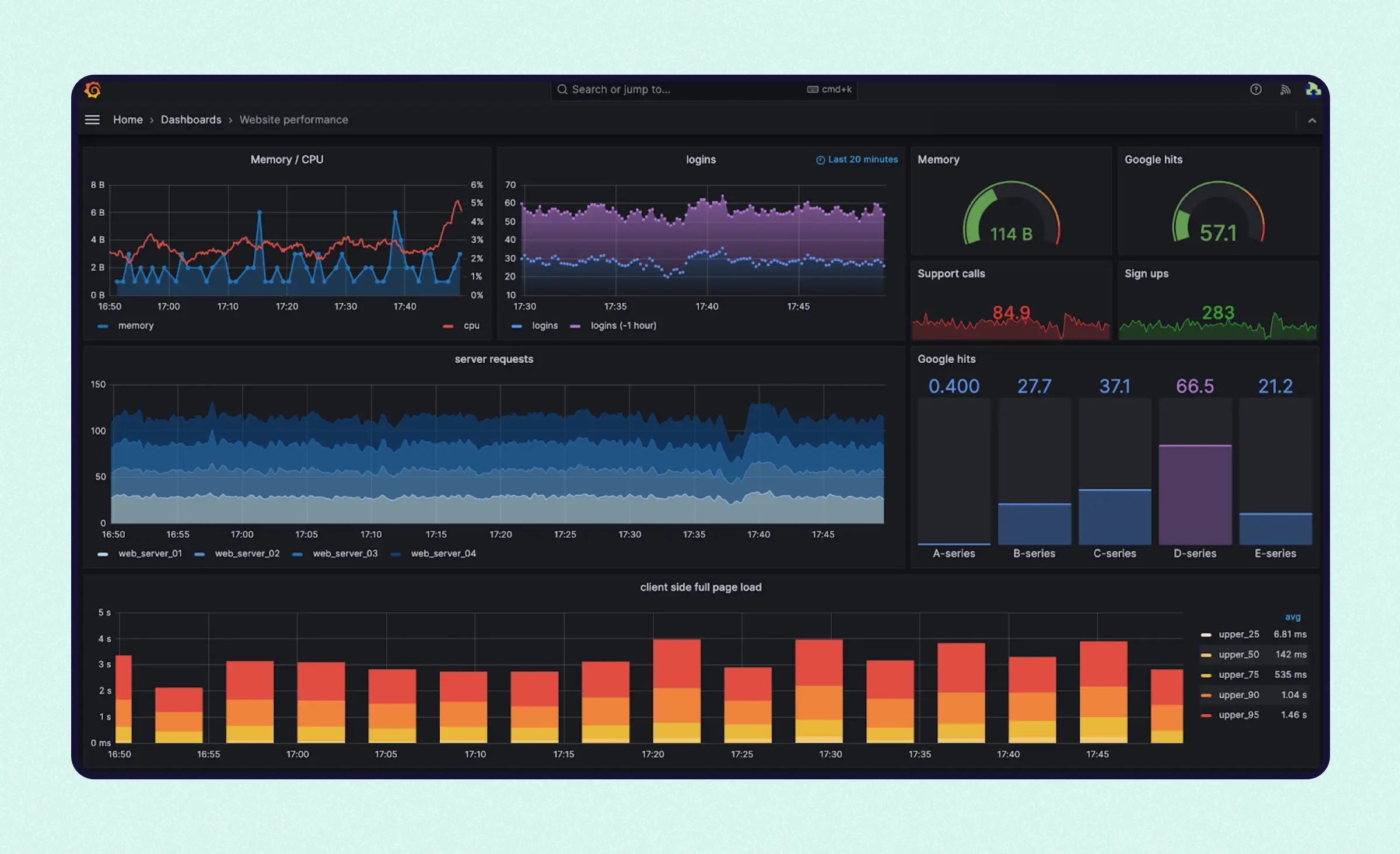
This is our default, not the only stack we will run. Datadog turns up on some client backends we inherit, and where it is already set up and working, we support it rather than ripping it out to match our own defaults. The tool changes with what a project is already running; watching production and alerting before a user complains does not.
Alongside whichever monitoring tools a project runs, containerized deployment is what makes rollbacks boring, which is the property you want most during an incident.
AI, ML, and SRE in app maintenance: what is real today
Predictive maintenance and Site Reliability Engineering appear in every vendor pitch, so here is an honest split between what is standard practice and what we build on request.
Standard on our plans: automated alerting, defined response times, log aggregation, containerized deployment with quick rollback, and cost review. None of that needs machine learning.
Available on request, as engineering work rather than as a checkbox: anomaly detection over logs and behavioral data to flag failures earlier, automated responses to specific anomaly patterns, and formal SLA, SLO, and SLI definitions with self-healing playbooks. We have the stack and the AI engineering practice to build these, and they make sense for high-load or mission-critical products. For a product with a few thousand users, a well-tuned alert costs less and works better. We will tell you which of the two you are.
What to do next
Four concrete steps, in the order we would take them on your project.
- Check your store position today. Open App Store Connect and Google Play Console and note your current target API level, your build toolchain version, and whether your EU trader status is filed. That tells you whether you have a deadline problem before you have a budget conversation.
- Split your backlog into support and development. Anything that keeps the app running goes in one list; anything that changes what it does goes in the other. Price them separately.
- Get a code audit if you inherited the codebase. The answer to “can this be maintained affordably” is a technical finding, not an opinion, and it occasionally comes back as “rebuild instead”.
- Match the plan to the stage. DevOps hours from $50 while you are validating, a $1,000-per-month subscription once you want predictable scope without a full support plan, technical support from $5,000 per month once real users depend on uptime, enterprise support from $15,000 per month when downtime has a revenue number attached.
If your app is already live and you want a second opinion on any of the four, send us the app and the backlog. We will tell you which deadlines are close, which items are support, and which are development, before anyone talks about a contract. Longer-term product questions such as when a redesign is justified and how long the next version will take are easier to answer once support and development are separated. If you are building for Apple platforms specifically, our iOS development team handles both sides.
Frequently Asked Questions (FAQs)
What do mobile app maintenance services include?
A maintenance contract normally covers five workstreams: availability monitoring, component and OS-compatibility updates, security patching, store-compliance releases tied to Apple's and Google's own deadlines, and cost control on cloud resources. Our DevOps Proactive Care plan covers the infrastructure workstreams, with a 24-hour response commitment; store-compliance releases are scoped and delivered as part of the same maintenance engagement, not as a separate line item.
How much do mobile app maintenance services cost per month?
A mobile maintenance subscription with predictable scope starts at $1,000 per month, or $50 per hour if you prefer Time and Materials instead of a plan. Our technical support plan starts at $5,000 per month and covers monitoring, infrastructure optimization, incident response, and preventive updates. Enterprise support with tighter response expectations starts at $15,000 per month. All three figures are always on our pricing page.
What happens if I never update my app?
The stores start limiting it before users complain. From August 31, 2026, Google Play requires existing apps to target Android 15 (API level 35) or higher just to stay visible to new users on newer Android releases; any app you actually update must target Android 16 (API level 36) or higher, so the day you need to ship a fix can also be the day you discover your target level is two versions behind. On the Apple side, uploads have required Xcode 26 and the iOS 26 SDK since April 28, 2026, so a build toolchain you never touch eventually cannot ship a hotfix at all.
Is app maintenance different from adding new features?
Yes, and mixing them is the most common budgeting mistake we see. Maintenance keeps a product that already satisfies you available, secure, and compliant. Adding screens, changing flows, or running A/B tests is product development and needs a development budget and a roadmap. We separate the two in the contract: one monthly plan for keeping the app alive, and separate development work for changing what it does.
How is mobile app maintenance different from web app maintenance?
Three differences drive the work. Mobile releases are not instant, so your backend has to serve old and new app versions at the same time. Mobile apps often work offline, which adds state restoration and data synchronization to the support scope. And mobile updates pass store review, so a one-line fix can take days instead of the minutes a web deploy takes.
How quickly do you respond to production incidents?
Under our DevOps Proactive Care plan we watch the client's production infrastructure and respond to issues within 24 hours. How quickly the work continues after that depends on the plan: business-hours coverage on our standard technical support, round-the-clock coverage on enterprise support. Automated alerting through Prometheus, Grafana, and Loki means the team usually sees a problem before a user reports it, and Sentry surfaces crashes and errors from the app itself. Clients also get a help desk so support requests do not queue behind a single engineer.
Can you maintain an app that another company built?
Usually yes, and the first step is a code audit, booked as an analysis phase rather than a support contract. We have advised against continuing to maintain a codebase before, once a SonarQube and IntelliJ IDEA review of a client's app showed that the test coverage needed to make it safely maintainable would cost more than rebuilding it, so expect an honest verdict before a plan, not an automatic yes.
Do I need maintenance if my app is still an MVP?
You need less of it, but not none. An MVP still has to pass store review, keep credentials and certificates valid, and stay on a supported target API level. What it rarely needs yet is a fixed monthly plan; buying DevOps hours is usually the right shape until traffic and revenue justify one.
Related posts


Related Services
React Native App Development Services
Save time and costs with Ronas IT's React Native app development, allowing cross-platform capabilities for iOS and Android. Our team has built 20+ React Native apps since 2020, ensuring rapid development, flexible maintenance, and cost-effective solutions.
iOS App Development Services
Choose native iOS when the product leans on Apple hardware, the newest OS features, or the wider Apple ecosystem. Ronas IT builds on Swift and SwiftUI and covers UI/UX design, development, the App Store release, and ongoing support, with single-purpose apps shipping in 8-12 weeks.
DevOps Services
Accelerate your software delivery with Ronas IT's DevOps services. We streamline development and deployment through CI/CD automation, proactive monitoring, and secure cloud infrastructure. Enjoy faster releases, minimal downtime, and scalable solutions — letting you focus on growth while we handle seamless operations.
AI Software Development Services
We deliver custom AI solutions, including generative AI, chatbots, predictive analytics, and recommendation systems. From strategy to integration and ongoing support, our expert team ensures secure, scalable, and value-driven AI applications tailored to your needs, so you can innovate faster and stay ahead of the competition.