

React Native is the right choice for an iOS app when you need iPhone and Android from one codebase, and the product is built from standard mobile surfaces: lists, forms, media, maps, payments, and push notifications. It is the wrong choice when the core of the product depends on Apple-only frameworks, real-time audio, or an Apple Watch app.
We are a React Native team that also ships native iOS apps in Swift, so we have no reason to talk you into the wrong one. This article gives you the line we use to decide, what each route costs, and what changed for iOS developers in the last two years.
React Native on iOS: what it actually builds
React Native compiles to a real iOS binary, ships through App Store Connect, and draws its interface with the same native components a Swift app uses. It is not a website wrapped in an app shell. Since version 0.76, released in October 2024, the framework enables its New Architecture by default, removing the asynchronous bridge that used to sit between JavaScript and native code. A year later, version 0.82 made it the only architecture: the setting that used to let a project opt back into the old bridge is now ignored on both platforms.
Most of the "React Native cannot do this" advice online was written before that change. What has not changed is the boundary: your JavaScript runs on top of native modules, and anything Apple exposes only through its own frameworks still has to be written in Swift, whether or not the rest of the app is JavaScript. We write these ourselves when a library does not exist yet; our react-native-controlled-input package ships a Swift and Objective-C++ module for iOS (Kotlin on Android), source public under an MIT licence.
iOS development technology options
Swift
Swift is Apple's own language for iOS, macOS, watchOS, and tvOS, and it is the default for new native projects. Paired with SwiftUI for interfaces, it gives you direct access to every framework Apple ships, usually on the day it ships. This is the stack we use for native iPhone app development.
Objective-C
Objective-C led iOS development before Swift and is now maintenance territory. We use it only to extend or support older codebases. No new project should start here.
React Native
React Native lets one team write the app once in TypeScript and ship it to both the App Store and Google Play. The interface is built from native components, so the app behaves like an iOS app rather than looking like a ported website. This is our React Native app development stack, usually together with Expo.
Flutter and the rest
Flutter is the main cross-platform alternative. It uses Dart and renders through its own engine instead of native components, which gives it an edge in heavily custom animation. Xamarin is no longer an option worth evaluating: Microsoft ended support for all Xamarin SDKs on 1 May 2024.
When to use React Native for an iOS app
These are the conditions that make us recommend React Native. In practice, one strong match is usually enough, and the first one on this list carries the most weight.
- You need iPhone and Android. This is the whole argument. One codebase, one team, one backlog, and platform-specific work concentrated in navigation, push, payments, and permissions.
- You are validating a product. When the goal is a first release in front of real users, shipping two platforms in the time it takes to build one is worth more than a few frames of scroll performance.
- Your product is built from standard surfaces. Feeds, search, profiles, chat, booking flows, dashboards, and checkout are all well-covered ground with production-grade libraries.
- You already have a React web app. Types, validation rules, and API clients move across, and your web developers can review mobile pull requests.
- You expect frequent small releases. JavaScript bundle updates reach installed apps without a new App Store submission, within the limits described below.
When to choose native iOS with Swift instead
We recommend native Swift when the hard part of the product sits inside Apple's own frameworks. In those cases React Native does not remove the native work, it just adds a JavaScript layer on top of work you still have to do in Swift.
- Apple frameworks are the product. ARKit for augmented reality, VisionKit for document and object scanning, or on-device Core ML inference. These have no meaningful JavaScript equivalent.
- Real-time audio or frame-level video. Anything where a dropped frame or a few milliseconds of latency is a defect belongs in the native path, not behind a JavaScript runtime.
- An Apple Watch app. A watchOS target is written in Swift and SwiftUI regardless of what the phone app uses. You can attach one to a React Native app, but if the watch is the product, start native. We cover this in more detail in our guide to wearable app development.
- You already have a Swift codebase. Adding a second runtime to a working native app buys you two toolchains and one team that has to know both.
- Your roadmap is Apple-only surfaces. Home screen widgets and Live Activities are built with SwiftUI in any case. When most of the next year looks like that, native is the simpler place to start.
Find the row that matches your product, and the second column tells you what we would build.
| Your situation | What we build | Why |
|---|---|---|
| iPhone and Android, shared feature set | React Native | One codebase covers most of the product |
| iPhone only, first release on a deadline | Either | Decide on the features below, not on price |
| Apple Watch app is the product | Native Swift | watchOS targets are SwiftUI either way |
| ARKit, VisionKit, or on-device Core ML at the core | Native Swift | These live only in Apple's frameworks |
| Real-time audio or frame-level video | Native Swift | Latency budget leaves no room for a JS layer |
| Existing Swift app, adding features | Native Swift | Two runtimes cost more than they save |
| React web app already in production | React Native | Shared TypeScript and shared reviewers |
| Frequent copy and layout changes after launch | React Native | JavaScript updates ship without a new review |
“Where the hard part of your product lives decides the framework, not which one is ‘better’. Teams get this decision wrong less because they picked the wrong stack, and more because nobody wrote down the three hardest features before development started.”
Evgeny Leonov, CTO at Ronas IT
Where the difference actually shows up
Both stacks draw native components, so the gap sits at the edges rather than in everyday screens. Swift reaches a new iOS feature the week Apple ships it, while React Native waits for a library or a native module someone has to write. In return, React Native adds Android without requiring a second full product implementation. Platform-specific code, QA, binaries, and store review still add work, but the shared codebase is a bigger lever than any single frame-rate argument for a team shipping its first version.
The scaling worry from older articles is mostly solved. TypeScript is the default in React Native projects now, which removes the type-safety problem that made large JavaScript codebases hard to refactor. Microsoft ships Office, Outlook, and Teams with React Native, and Shopify builds all of its mobile apps with it, including Shopify Point of Sale. Framework size is not the ceiling it used to be.
What React Native for iOS costs
A cross-platform app built with React Native starts at $20,000 and 4 weeks. A native iOS app starts at $25,000 and 8 weeks. Both figures are on our pricing page.
What React Native saves you is the second build. One codebase covers iPhone and Android, so if you need both, you avoid most of the work of a second app. If you only ever need iPhone, a $5,000 gap is too small to drive the decision, and you should choose on the feature list instead.
Those are entry prices for a first release. Once a native iOS project grows past that, a single-purpose app covering one role, the core flows, an API, and the App Store release typically costs $25,000 to $45,000 over 8 to 12 weeks. Add payments, an admin panel, and third-party integrations for a multi-role build, and the range moves to $45,000 to $90,000 over 3 to 5 months. If the scope is not defined yet, an analysis phase costs $2,000 to $3,000 and takes 1 to 2 weeks, and it produces a feature breakdown and a delivery plan you can hold us to. After launch, ongoing work runs on time and materials at $50 per hour, or you can choose a maintenance subscription starting at $1,000 a month for predictable scope. For a breakdown of where the money goes stage by stage, see what affects React Native app cost.
Over-the-air updates on iOS: what changed after CodePush
If you are reading an older guide about React Native on iOS, it almost certainly recommends CodePush. That tool is gone. Microsoft retired App Center, CodePush included, on 31 March 2025, and archived the react-native-code-push repository on 20 May 2025. Apps still pointing at the old service receive nothing.
We use EAS Update through the expo-updates package instead. It publishes a new JavaScript bundle to installed apps within hours, which earns its keep the first time you ship a wrong price, a broken layout, or a crash found an hour after release.
The limit is set by Apple, not by the tooling. App Store Review guideline 2.5.2 says an app may not download code that introduces or changes its features or functionality. In practice that means fixes, copy, and layout adjustments ship over the air, and a new feature area still goes through review. Treat over-the-air updates as a fast lane for corrections, not as a way around the App Store.
How we shipped OddsCrowd's iOS app in 10 weeks
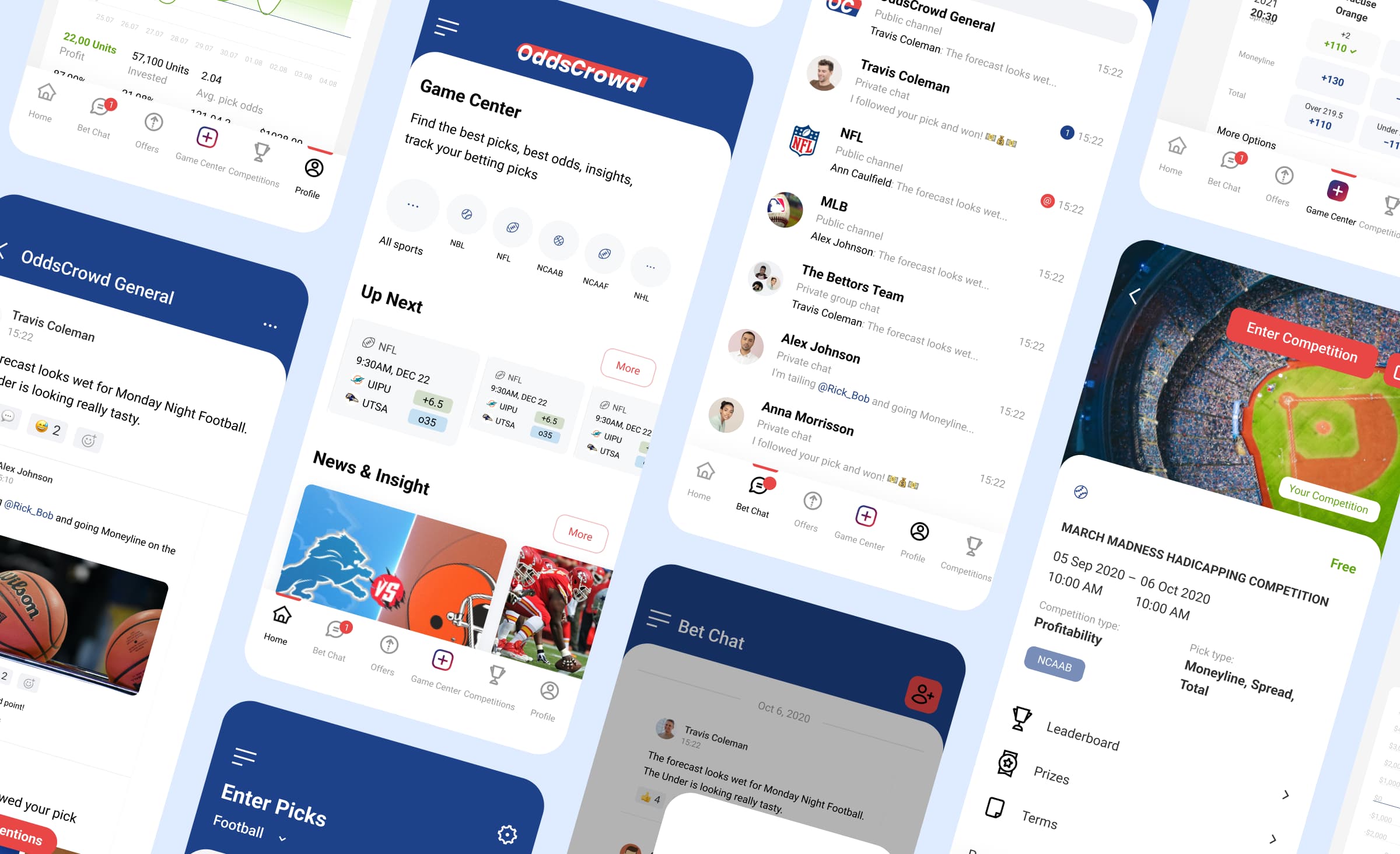
OddsCrowd is a community for sports bettors. We had already built their web platform when they decided to add a mobile app, and the idea arrived 10 weeks before the Super Bowl. That deadline was the reason we chose React Native: one codebase was the only realistic route to the App Store and Google Play before kickoff.
We used Expo for the toolchain and testing, Expo Notifications for push, Sentry for production error tracking, and Firebase Analytics for usage data. Deep links and Firebase Dynamic Links carried a user from a web page to the same screen in the app, including after a fresh install. Firebase retired Dynamic Links in August 2025. Universal Links on iOS and App Links on Android cover the already-installed half of that job now, but neither one carries a link through the app store install itself; the fresh-install case needs a dedicated deferred deep-linking provider such as Branch or AppsFlyer, which is what Firebase's own migration guide points to.
One decision shows the trade-off React Native forces you to make out loud. OddsCrowd asked for the Tapjoy library to measure ad campaigns. Tapjoy had no SDK compatible with Expo, so adding it meant leaving Expo and rebuilding the whole toolchain, which would have pushed the budget up and the deadline out. We tracked the same numbers with Firebase Dynamic Links and our own backend instead. In a native project that library would have dropped in without an argument, and in exchange we would have been building two apps rather than one.
Design to first release took 10 weeks. The monthly number of users increased by 10 times shortly after release, and the app passed 2,000 downloads across the stores. The full write-up, including the user flow and the analytics setup, is in the OddsCrowd case study.
iOS apps built with React Native
Meta's Facebook Ads Manager was the first fully React Native iOS app, and the framework's official showcase now names iOS apps from Microsoft, Amazon, Shopify, and Wix. Airbnb is the counter-example: it moved off React Native in 2018, years before the New Architecture existed, and its reasons were about maintaining a mixed codebase in a large native organization. Who confirmed each of those apps, and when, is set out in our list of well-known apps built with React Native. Apps at this scale prove React Native can carry a serious product; none of them proves it suits yours, which is what the table above is for.
Hiring for React Native on iOS
JavaScript was the most used language in the Stack Overflow Developer Survey 2025, reported by 66% of all respondents and 68.8% of professional developers. Two practical things follow. The pool of developers who can pick up your codebase is much larger than the Swift pool, and if you already employ React developers, part of your existing team can contribute to the mobile app.
This cuts both ways. A large pool means more candidates, not better ones, and mobile-specific experience still matters: App Store releases, background tasks, push delivery, and store policy are not things a web developer picks up in a sprint.
How to choose between React Native and Swift: 5 checks
Run these five checks before you commit to a stack. They take about an hour.
- Write down which platforms you need at launch, and which you need 12 months later. If Android appears in either line, React Native is the default.
- List the three hardest features in the product. Check each one against ARKit, VisionKit, Core ML, and real-time audio or video. Any hit moves that feature into native code.
- Decide whether an Apple Watch app is part of the product or a later add-on.
- Check whether you already have React developers or an existing Swift codebase.
- If steps 2 and 3 come back clean, start with React Native, more so if step 4 turned up React developers or a web codebase to share. If either 2 or 3 lands on Apple-only territory, start native in Swift, more so if step 4 turned up an existing Swift codebase already in production.
If your answers are mixed, that is the normal outcome, and it is what an analysis phase resolves: 1 to 2 weeks and $2,000 to $3,000 to turn the feature list into a scope, a stack recommendation, and an estimate before anyone writes code.



Frequently Asked Questions (FAQs)
Is React Native good enough for an iOS app in 2026?
Does Apple approve apps built with React Native?
Can React Native build an Apple Watch app?
How do over-the-air updates work on iOS now that CodePush is gone?
Is React Native cheaper than Swift for an iPhone-only app?
Can we start with React Native and move to Swift later?
How long does a React Native iOS app take to build?
Related posts






Related Services
React Native App Development Services
Save time and costs with Ronas IT's React Native app development, allowing cross-platform capabilities for iOS and Android. Our team has built 20+ React Native apps since 2020, ensuring rapid development, flexible maintenance, and cost-effective solutions.
MVP Development Services
Need to launch your startup quickly? Ronas IT offers urgent MVP development services, allowing you to get a fully-functional app in 4 to 12 weeks, depending on scope. Ideal for testing business ideas, presenting to investors, or entering the market swiftly. Benefit from our extensive experience and accelerated development process.
Cross-platform App Development
Ship to iOS and Android from one React Native codebase instead of funding two native teams. Ronas IT handles UI/UX design, development, and the releases to Google Play and the App Store, delivering high-performance, secure apps within 2 to 4 months.
iOS App Development Services
Choose native iOS when the product leans on Apple hardware, the newest OS features, or the wider Apple ecosystem. Ronas IT builds on Swift and SwiftUI and covers UI/UX design, development, the App Store release, and ongoing support, with single-purpose apps shipping in 8-12 weeks.