Serverless vs. containers: Choosing the right deployment strategy for cloud-native apps

Cloud computing has changed how businesses build and run their software. Today, cloud-native applications help companies move faster and serve more users. But with different deployment strategies, it can be hard to pick the right one. Many businesses compare serverless vs containers when planning application modernization because your choice impacts application architecture, costs, and how easily you can scale.
Having a strong cloud adoption strategy means more than just moving apps online. Deciding between serverless architecture and containers is important for long-term growth. A careful cloud services comparison helps you decide what's best for your business. In this article, we explain the main options for cloud deployment, discuss their benefits, and share how we approach app architecture.
What is serverless architecture?
Serverless architecture is a way to build and run apps without managing any servers. With serverless computing, you let cloud providers take care of all server setup and maintenance. This means your team can spend more time building features for your business.
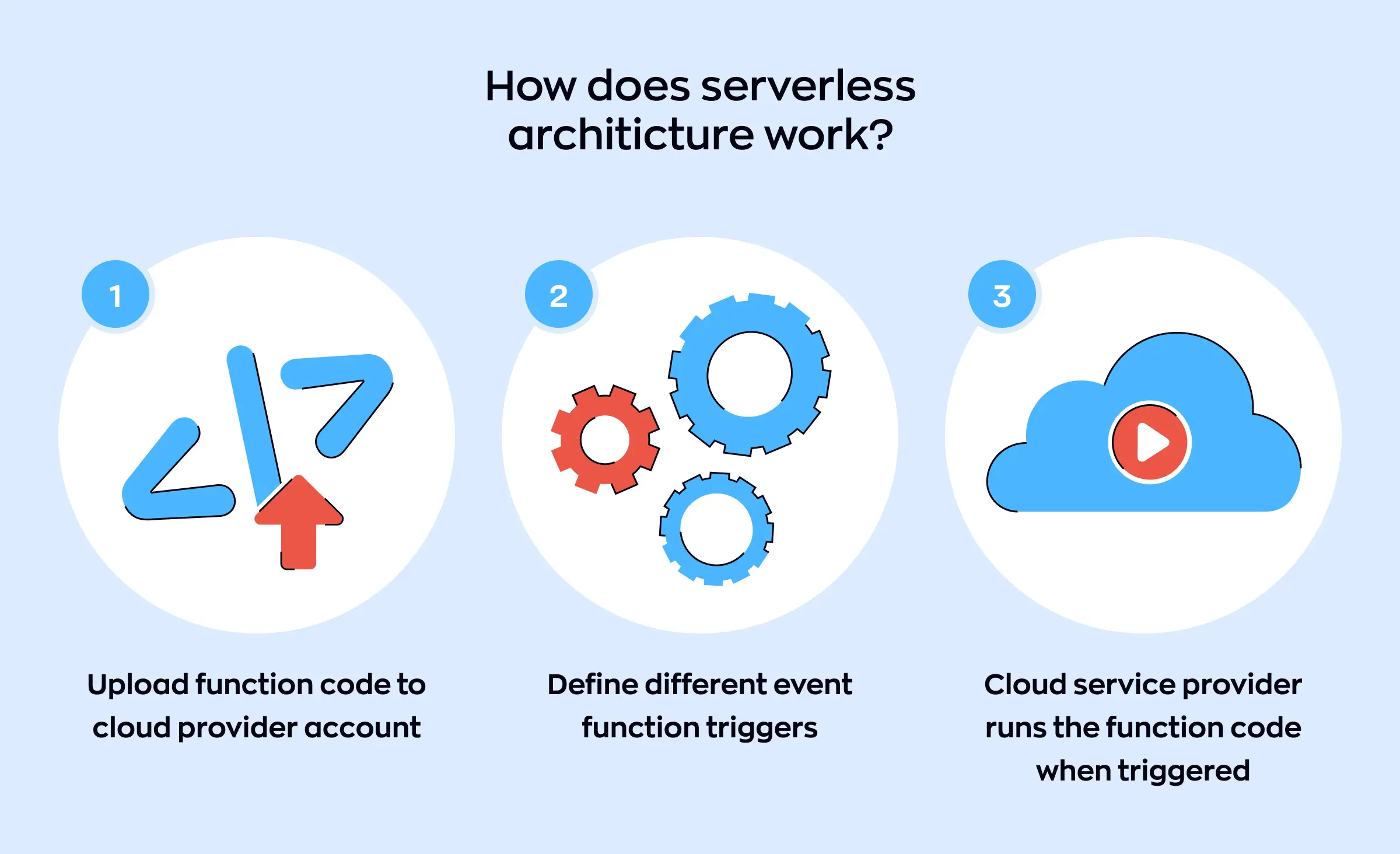
One big reason companies choose serverless architecture is cost optimization cloud. You only pay for the computing time you actually use, so there is no waste. Serverless is great for cloud-native applications because it makes scalability in the cloud simple. If your app gets more users, it can grow automatically without extra work from your team. When you look at cloud deployment models, serverless is a great option to consider for your cloud strategy. It can work in public or hybrid cloud environments, and brings many serverless benefits like speed and flexibility. But, it is important to see if this approach fits your application architecture and your business plans.
A common type of serverless computing is FaaS (Functions as a Service). This lets developers write small pieces of code that run only when they are needed. It also boosts developer productivity and helps businesses launch new ideas faster. Since these are managed services, the business does not have to worry about server issues.
Other types of architectures to consider
When building software for the cloud, businesses have several deployment strategies to choose from. Besides serverless, two common approaches are containers and monolithic applications.
Containers
Containers have changed the way we approach application architecture. Using tools like Docker, developers can put app parts into containers, which makes it easy to move between different environments. Containers package all the code and dependencies together, which helps with cloud migration and simplifies testing.
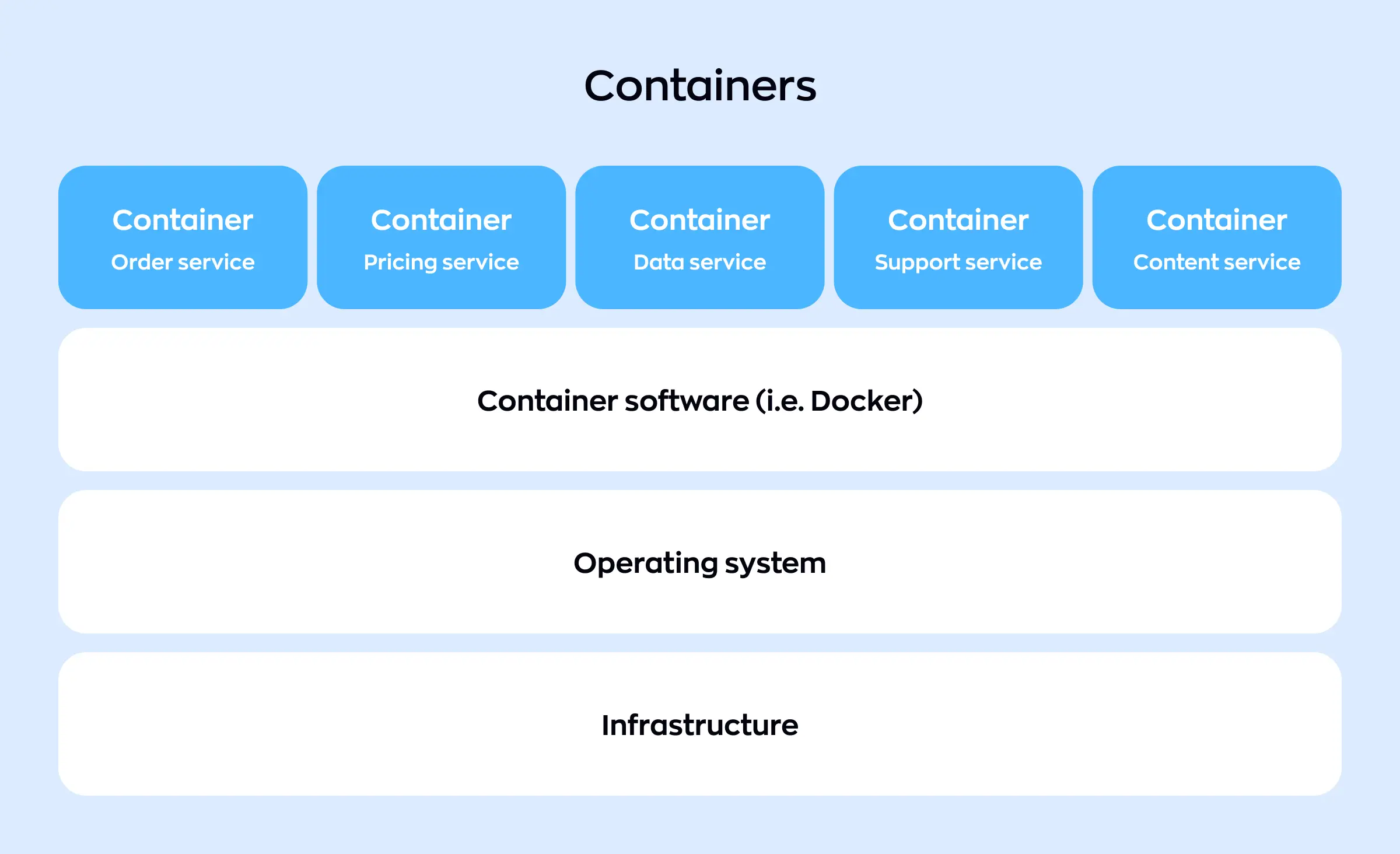
Managing lots of containers can get complicated as your app grows, so many companies turn to Kubernetes orchestration. Kubernetes helps organize and manage groups of containers automatically, making sure everything runs smoothly. If you are comparing Docker vs Kubernetes, remember that Docker creates and ships containers, while Kubernetes is used to manage and scale many containers at once, so developers typically use both.
Containers are a great choice for application modernization, as they allow you to update parts of your app without affecting the whole system. Using microservices deployment helps businesses scale, innovate faster, and improve security.
Monolith
Monolithic apps have a different kind of application architecture. A monolith is a single, large application where all features run together. This approach can be simpler at first, but it can limit scalability in cloud environments as your app grows. If you want to switch to newer systems, monoliths are usually harder to change and update.
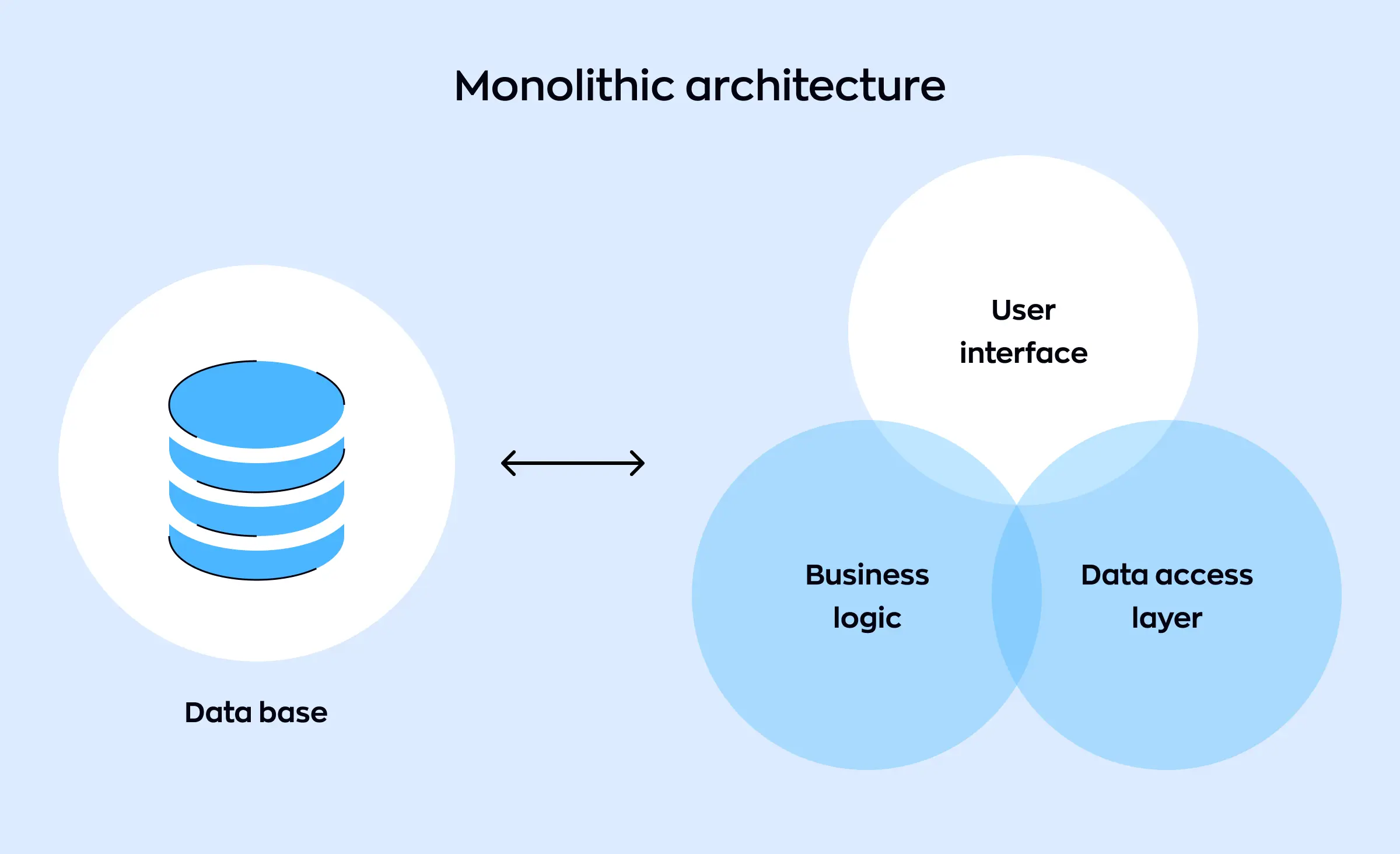
Businesses thinking of cloud computing or planning a cloud migration may look to break a monolith into smaller parts using modern deployment strategies. Moving to containers or adopting microservices deployment can bring benefits like easier updates and better reliability. Choosing PaaS (Platform as a Service) can also support this change by offering ready-to-use tools and reducing maintenance worries.
Pros and cons of serverless architecture
Serverless architecture offers both strengths and weaknesses like any modern technology. Understanding these points helps you choose the best cloud strategy for your company.
Serverless benefits
Lower operational effort
One of the main serverless benefits is less management. Serverless computing means your cloud provider handles the entire infrastructure. This lets your team focus on new features, not server setup, thanks to managed services. With this shift, developer productivity increases and you can deliver updates faster.
Cost optimization in cloud
Serverless architecture allows you to pay only for what you use, so there are no extra costs for idle time. The cost optimization cloud is a natural outcome. For businesses with changing workloads or unpredictable app usage, this keeps spending under control.
Easy scalability in cloud
Scalability in cloud happens automatically with serverless. If your app sees a spike in demand, the platform adds resources. When things slow down, it reduces them. This automatic scaling removes the guesswork and risk from estimating server needs and is a huge advantage of serverless computing.
Fast deployment
Deploying updates is easy, which fits modern deployment strategies for cloud-native applications. Serverless encourages organizing software into small, independent parts. This application architecture pairs well with trends like infrastructure as code. It also supports fast and reliable updates with little to no downtime.
Downsides of serverless
Less control over your environment
In serverless architecture, you rely heavily on the cloud provider's setup. This can limit how much you tweak your application architecture for special needs. If your project needs a lot of customization, this might be a drawback.
Cold starts and performance challenges
Serverless computing can introduce “cold starts.” If a function has not run for a while, it might be slow on the first request. This could impact user experience for time-sensitive applications.
Monitoring and troubleshooting complexity
With apps split across managed services, tracking down problems gets tricky. New monitoring tools and skills are often required. Teams need to adapt to these changes as they shift deployment strategies.
Potential for vendor lock-in
Since serverless is closely tied to each cloud provider's own services, moving apps to a different provider later may take effort and time. When planning cloud strategy, consider how vendor lock-in could affect your future.
When choosing between serverless vs containers, think about your business needs for flexibility, control, and speed. Serverless deployment strategies are great for cloud-native applications that need fast changes, cost optimization cloud, and easy scalability in cloud, making them ideal for teams focused on quick launches and frequent updates. Containers, like Docker and Kubernetes, offer more control over application architecture and environment, making them a better option for complex systems, deep customization, or meeting strict compliance. Both serverless computing and container solutions can increase developer productivity and support application modernization, so your cloud strategy should match your goals for cloud migration, performance, and growth.
Serverless vs containers – which strategy is better for software development?
When building cloud-native applications, many businesses face the question: serverless vs containers. Choosing the right deployment strategies affects how well your app runs, the cost, and the future growth of your business.
How the strategies work
Serverless and containers have different styles and purposes. Serverless means letting cloud providers run your code without you handling servers. Containers, on the other hand, package your app and its settings so it can run anywhere. Docker containers are a popular way to do this, and many teams use container platforms to support application modernization.
With containers, developers often use Docker and Kubernetes as their main tools — Docker containers make packaging apps simple, while Kubernetes orchestration helps manage large groups of containers. These tools offer containerization benefits by improving flexibility and portability between environments.
Comparing application architecture and performance
When considering application architecture, containers give more control over your environment and dependencies, which is very helpful for complex projects. Containers are also a good fit for microservices deployment, as each piece of an app can be updated and managed separately. Serverless works well with simple, event-driven parts of cloud-native applications but can have limits with custom setups.
Application performance can also vary. Serverless may face slight delays (called “cold starts”) if no function has run for a while. Containers often deliver more stable performance for high-traffic or steady-use apps. Since many companies need top performance, this is an important part of the serverless vs containers debate.
Scaling, costs, and software delivery
Both methods support scalability in cloud, but in different ways. With serverless, scaling is automatic and handled by the cloud. Containers can also scale fast, especially with Kubernetes orchestration, but require more setup at first. If cost optimization cloud is a main goal, serverless usually saves on resources for apps that don't run all the time.
Modern teams often use CI/CD for cloud-native projects. Containers, paired with CI/CD for cloud-native, create a smooth way to build, test, and deploy changes. This pattern also helps with fast microservices deployment and supports application modernization.
Which to choose?
For a clear cloud services comparison, serverless works best for flexible, event-driven workloads and simpler apps. Containers and container platforms are more suited for projects needing full environment control, higher application performance, and complex application architecture. Each has different deployment strategies and fits different cloud deployment models.
| Factor | Serverless | Containers |
|---|---|---|
| Deployment strategies | Provider-managed, no server setup needed | Self-managed, portable using container platforms |
| Application architecture | Great for small, event-driven functions | Best for complex, customizable structures |
| Scalability in cloud | Automatic and elastic | Manual or automated |
| Application performance | May have cold starts, some latency | Consistent, high performance |
| Cost optimization cloud | Pay per actual use, no idle charges | Pay for allocated resources, even if idle |
| CI/CD for cloud-native | Fast integration, small updates | Smooth for frequent microservices deployment |
| Microservices deployment | Easy for lightweight, stateless parts | Ideal for full microservices architecture |
| Management | Minimal operations, managed services | More setup and ongoing management |
| Cloud services comparison | Flexible, quick to set up | Full control, broad modernization possibilities |
| Vendor lock-in | Higher risk – linked to provider | Lower risk – easy provider switch |
In the end, serverless vs containers depends on your business's needs, growth plans, and the technical skills of your team. Both approaches offer strong benefits and can help move your development forward.
How can Ronas IT help?
At Ronas IT, we help with cloud migration, so your business moves safely from old systems to cloud-native applications. We set up managed services like automatic backups and monitoring to keep your app working well. Our team builds CI/CD for cloud-native apps, so you get faster, safer updates. We use infrastructure as code to make your cloud setup clear and easy to control.
If you want to use Docker containers, we set them up and manage them for you. Our experts can also build solutions on container platforms and handle Kubernetes orchestration. This helps your app scale, using the best deployment strategies for your needs.
For companies interested in serverless architecture, we design and launch simple, cost-saving systems with easy scaling. We help you pick the right cloud strategy and make sure your business can grow smoothly with scalability in cloud. Moreover, we have a ready-made architecture solution based on Google Cloud to help businesses launch faster.
Case: Neobank app for the USA
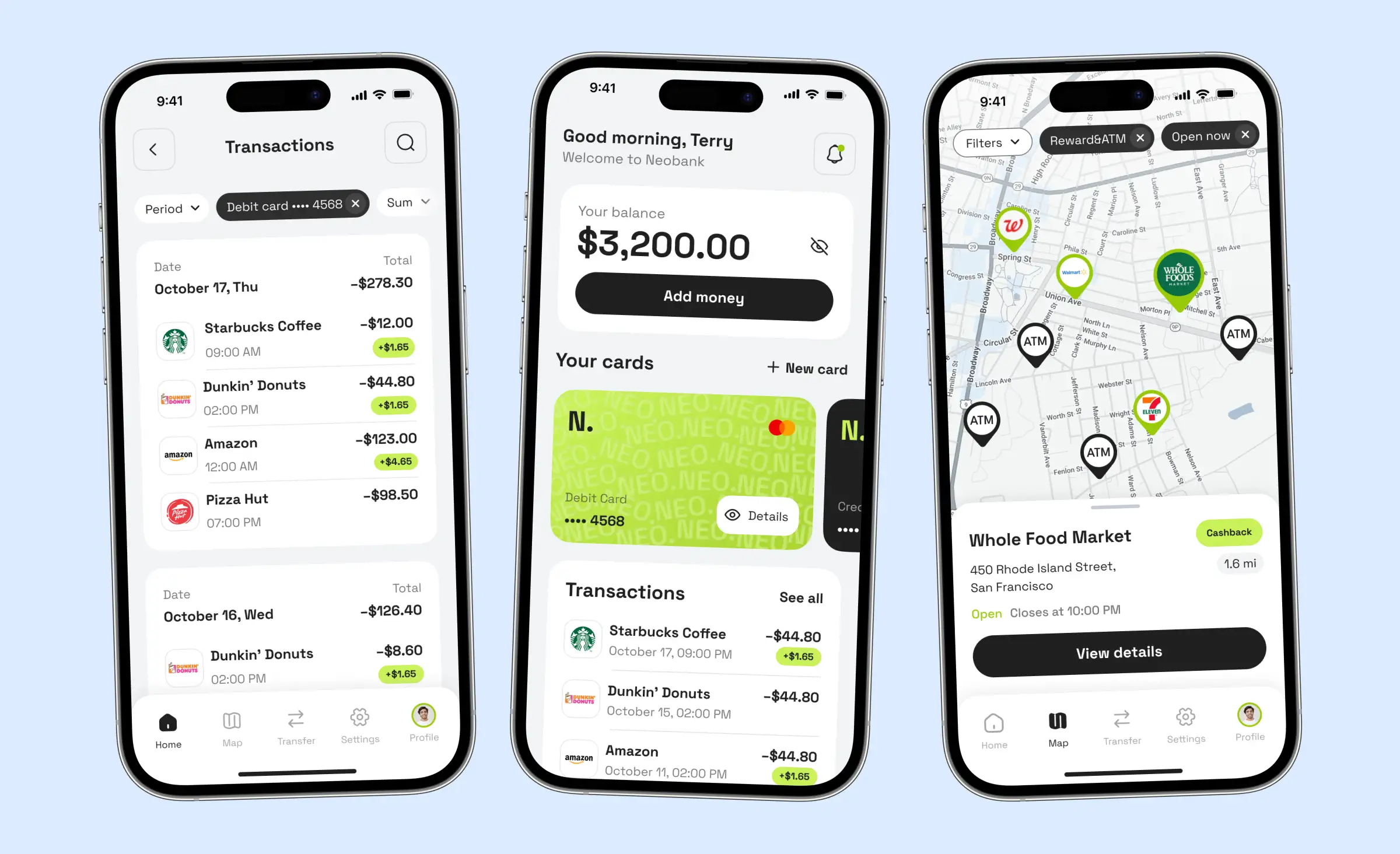
We developed a US-based neobank app to help users build their credit score and access credit cards. Using React Native for mobile, Laravel for backend, and a microservice architecture, we built independent services for authentication, transactions, rewards, and more—each with its own database for maximum security. Sensitive data is never stored, only passed securely for KYC verification and bank processing. We integrated Bond BaaS, Persona and Sardine for KYC, and other third-party services to automate banking, protect against fraud, and deliver rewards instantly. Our team set up managed access, backups, and compliance with SOC 2 and PCI DSS standards, ensuring the app is stable, secure, and ready for growth.
To conclude
When it comes to serverless vs containers, there is no single answer for every business. The right choice depends on your cloud adoption strategy, the needs of your application architecture, and how you plan to use cloud-native applications. Both serverless computing and containers offer unique advantages. Serverless benefits include lower management costs and easy scalability in cloud, while containers deliver strong containerization benefits for teams needing more control, especially when using Docker vs Kubernetes for orchestration.
Modern deployment strategies focus on flexibility, cost optimization cloud, and fast delivery of new features through CI/CD for cloud-native projects. As microservices deployment becomes more common, businesses also need to think about application performance and the best ways to handle cloud migration or future updates. Choosing cloud deployment and evaluating cloud deployment models are important steps to maximize ROI and support business growth.
No matter the path you take, a thoughtful cloud services comparison and careful planning will help you get the most from your investment. With world-class options available for cloud-computing, every company can find a model that supports their goals for innovation, reliability, and speed.
Related posts











Related Services
Development
React Native App Development Services
Development
MVP Development Services
Development